
iPhone Screen Black but Phone Is On? How to Tell a Display Problem From a Board Problem

Your customer's iPhone screen black but phone is on — it still rings, vibrates, and makes notification sounds. Is it a screen problem or something deeper? This is one of the most common diagnostic questions in any repair shop, and getting it wrong is expensive. Replace a $50–$80 screen on a phone with a board-level fault and you've wasted a screen, an hour of labour, and your customer's trust. Miss a simple display connector issue and you've quoted a customer $200+ for a "board repair" that actually needed a 30-second reseat.
The iPhone "black screen of death" accounts for a significant share of walk-in repair jobs, but the root cause varies wildly. Sometimes it's a cracked OLED panel. Sometimes it's a loose display connector. Sometimes it's a logic board fault that no screen replacement will fix. The diagnostic process that separates these causes takes less than five minutes — but only if you know what to check.
This guide covers the systematic diagnostic approach that experienced repair technicians use to identify whether a black screen is a display problem or a board problem, with practical steps you can follow in your shop.
Sourcing Replacement Screens in Bulk?
Incell / Hard OLED / Soft OLED grades — wholesale pricing, grade comparison on request.
Get Wholesale QuoteWhy Your iPhone Screen Is Black but the Phone Is On
Before jumping to diagnostics, it helps to understand why this symptom pattern exists. A modern smartphone has two largely independent systems: the logic board (which runs the OS, handles calls, and processes audio) and the display assembly (which renders the visual output). When the display fails but the logic board keeps running, you get exactly this symptom — a phone that rings, vibrates, plays sound through the earpiece, and responds to Siri, but shows nothing on screen.
This separation is why the "black screen but phone still works" symptom is actually useful diagnostically. It tells you the phone's core system is functional. The problem is somewhere in the display pipeline — which could be the screen itself, the connection between screen and board, or the display driver circuitry on the logic board.
The three most common causes, in order of frequency:
-
Physical display damage — cracked OLED/LCD panel, damaged display flex cable, or backlight failure. This is the most common cause and the one repair shops want to find, because it's a straightforward screen replacement.
-
Connector issue — the display flex cable has come loose or been damaged at the connector. Common after drops, DIY repair attempts, or screen replacements using cheap screens with poorly manufactured flex cables.
-
Board-level fault — the display driver IC, backlight circuit, or related components on the logic board have failed. This is the least common but most expensive cause, and it's the one you need to rule out before committing to a screen replacement.
The 5-Minute Black Screen Diagnostic: Step by Step
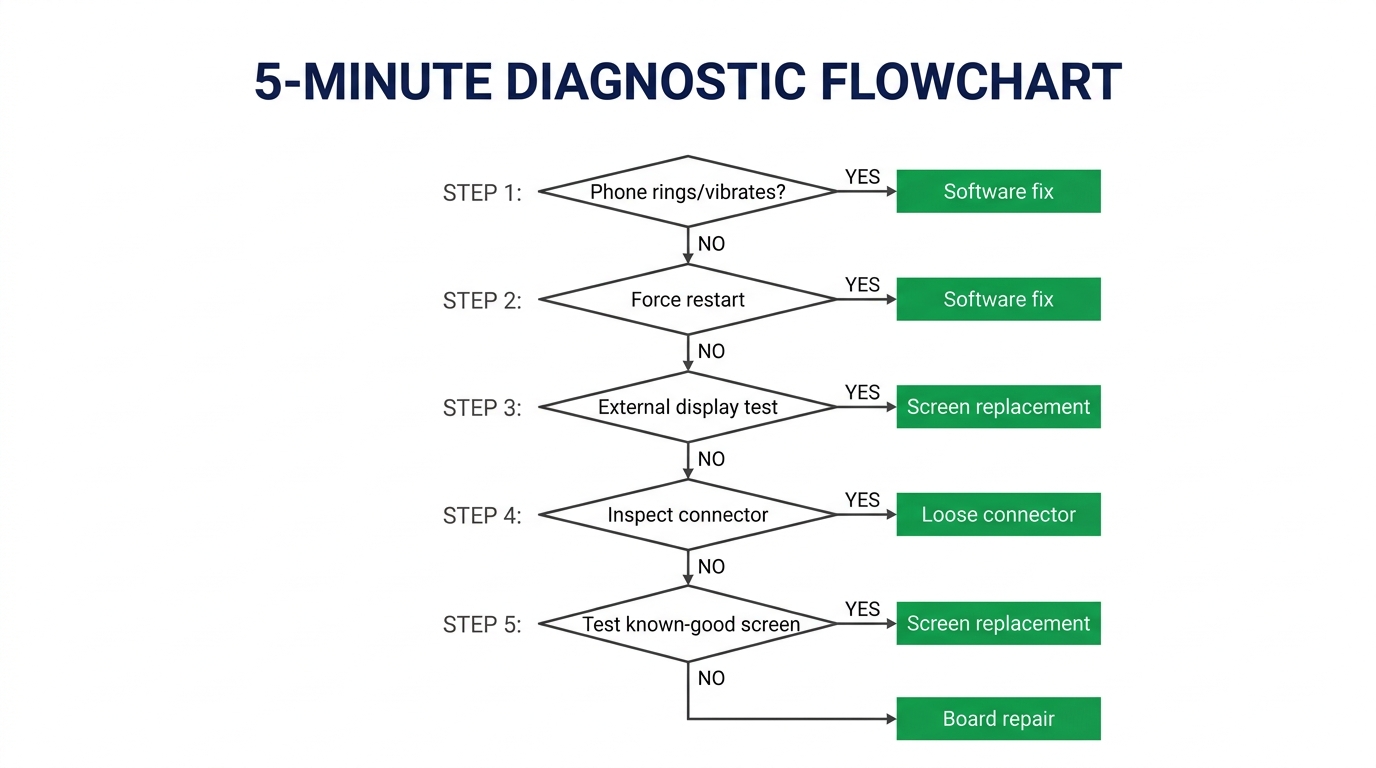
Every black screen diagnosis should follow this sequence. Start with the quickest, cheapest checks and work toward the more involved ones.
Step 1: Confirm the Phone Is Actually On
This sounds obvious, but verify it. Call the phone from another number — does it ring? Does the vibration motor work? Can you activate Siri with a long press on the side button? If the phone produces sound and haptic feedback, the logic board and battery are functional. If the phone shows zero signs of life (no sound, no vibration, no response), the problem isn't the display — it's the phone itself (dead battery, board failure, or water damage).
Time: 30 seconds
Step 2: Force Restart
A surprising number of "black screen" phones are experiencing a software hang, not a hardware fault. On iPhone 8 and newer: press and quickly release Volume Up, press and quickly release Volume Down, then press and hold the Side button until the Apple logo appears.
If the screen comes back after a force restart, it was a software issue. Tell the customer to update iOS and monitor for recurrence. If the screen stays black, proceed to Step 3.
Time: 30 seconds
Step 3: External Display Test (Where Possible)
For iPhones that support screen mirroring (iPhone with USB-C or Lightning-to-HDMI adapter), connect to an external monitor. If the phone's interface appears on the external display, the logic board's display output circuitry is working — the problem is almost certainly the screen assembly or its connection.
Not every phone or situation allows this test, but when it works, it's one of the fastest ways to confirm a display-side fault.
Time: 1–2 minutes
Step 4: Open the Phone and Inspect the Display Connector
This is where the real diagnosis happens. Open the phone and visually inspect:
- The display flex cable connector on the logic board. Is it fully seated? Are any pins bent, corroded, or damaged? A loose connector is the easiest fix in the shop — reseat it, power on, and the screen often comes right back.
- The display flex cable itself. Look for tears, kinks, or burn marks. Flex cables are fragile, especially on iPhone 11–14 series where the cable routes close to the battery connector. A damaged flex cable means the screen assembly needs replacing.
- The display connector on the logic board side. Look for corrosion, lifted pads, or physical damage to the FPC connector. Damage here points to a board-level issue.
If the connector looks clean and properly seated, proceed to Step 5.
Time: 2–3 minutes
Step 5: Test With a Known-Good Screen
This is the definitive test. Keep a known-working display assembly for each common iPhone model in your shop specifically for diagnostics. Connect the test screen — you don't need to fully install it, just connect the flex cable and power on.
If the test screen displays normally, the customer's original screen is faulty → screen replacement. If the test screen also shows a black display, the fault is on the logic board → board-level repair or referral.
Time: 2–3 minutes
Summary: Black Screen Diagnostic Decision Tree
| Test | Result | Diagnosis |
|---|---|---|
| Phone rings/vibrates? | No | Not a display issue — check battery/board/water damage |
| Force restart? | Screen returns | Software hang — no hardware repair needed |
| External display works? | Yes | Display-side fault (screen or connector) |
| Connector inspection | Loose/damaged | Reseat or replace connector — may not need new screen |
| Known-good screen test | Test screen works | Original screen is faulty → replace screen |
| Known-good screen test | Test screen also black | Board-level fault → board repair needed |
Display Problem: What to Do Next
If your diagnosis points to a display-side fault — the screen assembly itself is damaged — you're looking at a standard screen replacement. This is the outcome repair shops want because it's a well-understood job with good margins.
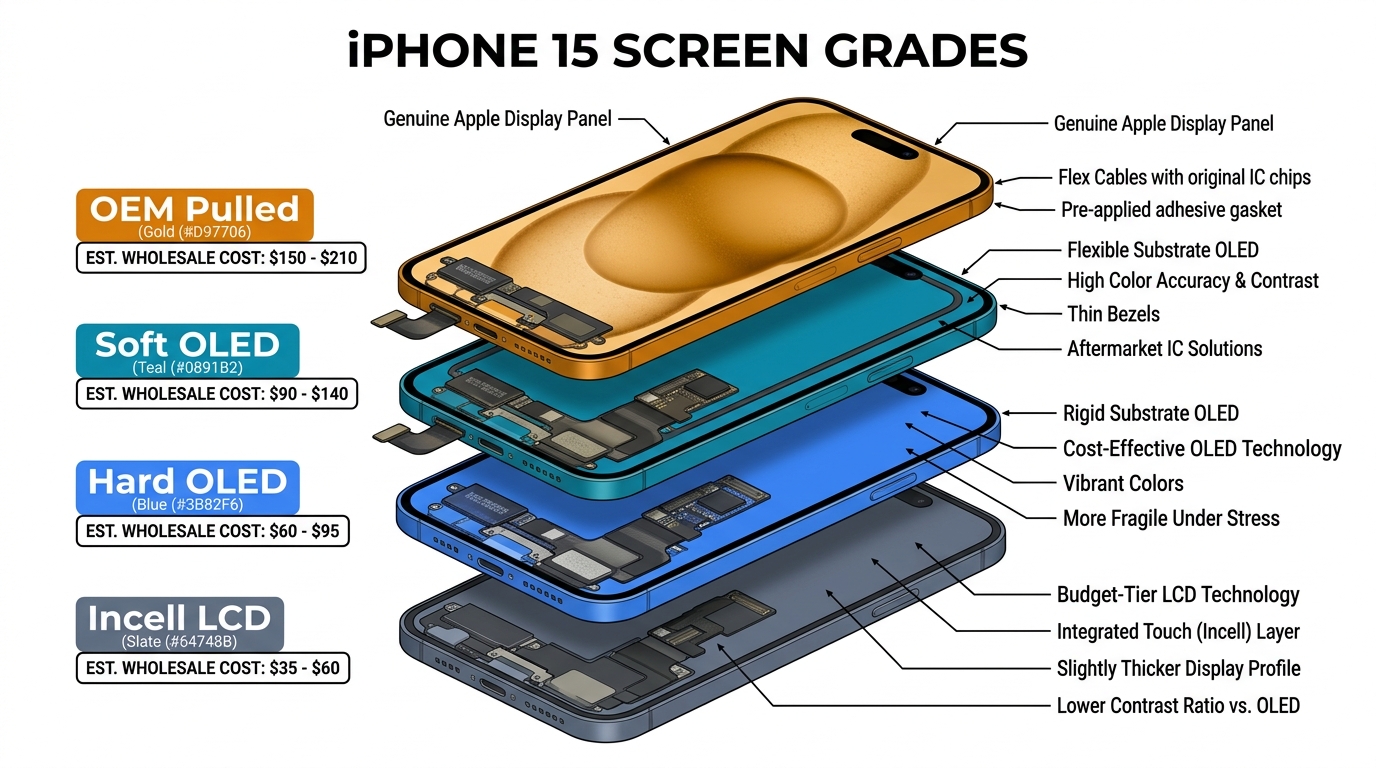
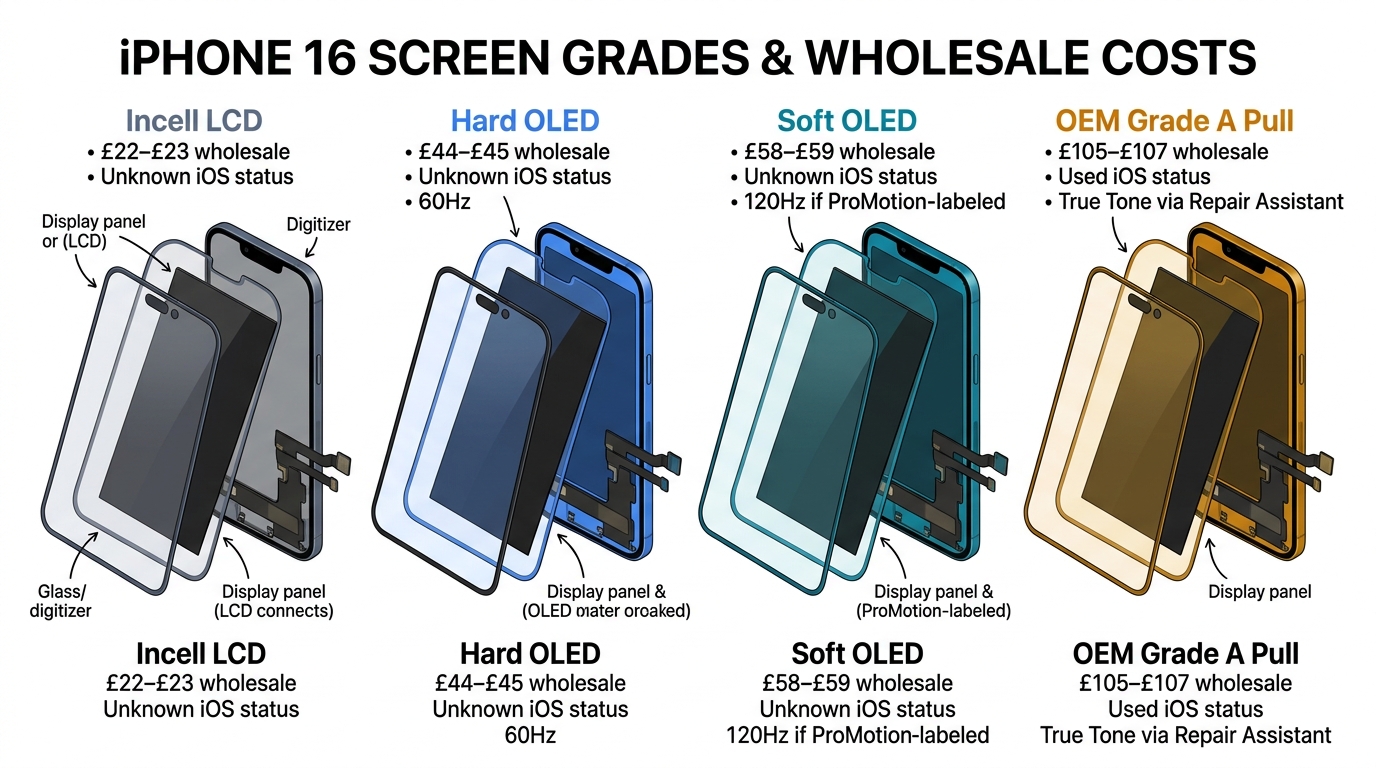
The key decision now is which screen grade to install. The same grade considerations that apply to cracked-screen repairs apply here:
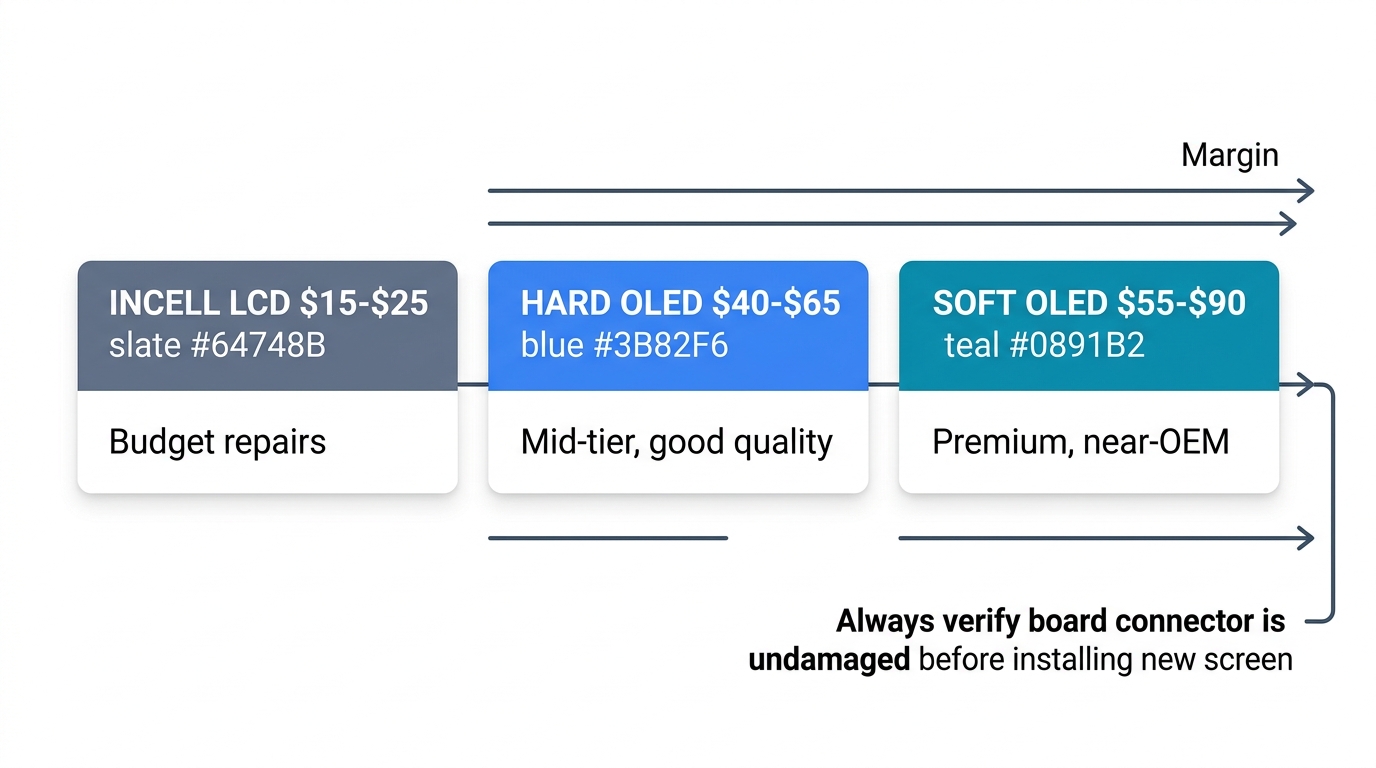
| Screen Grade | Wholesale Cost (iPhone 13 example) | Best For |
|---|---|---|
| Incell LCD | $15–$25 | Budget repairs, customers who just need a working screen |
| Hard OLED | $40–$65 | Mid-tier repairs, good quality at reasonable margins |
| Soft OLED | $55–$90 | Premium repairs, near-OEM quality |
See the full four-grade comparison with live wholesale prices: iPhone Screen Grade Guide
For a detailed breakdown of screen grade economics by model, see our guide on iPhone 13 screen replacement cost and repair margins and iPhone 14 screen grade selection for repair shops.
One important note on black-screen replacements vs. cracked-screen replacements: When a screen goes black without visible physical damage, there's a higher chance that the flex cable or connector was the actual failure point. Before installing a new screen, always verify that the logic board connector is undamaged — otherwise the new screen may fail the same way.
Board Problem: What Repair Shops Should Know
If the known-good screen test comes back black, you're dealing with a logic board issue. The most common board-level causes of black screen:
Display Driver IC Failure
The display driver IC (sometimes called the DDIC or TDDI controller) converts the logic board's digital signal into the analogue signals that drive the display. When this chip fails, the phone functions normally but produces no display output. This is a micro-soldering repair that requires board-level skills and equipment (hot air station, microscope, replacement IC).
Backlight Circuit Failure
On older LCD models (iPhone 8, SE 2nd gen), backlight failure produces a specific symptom: the screen appears completely black, but if you shine a bright flashlight at the screen at an angle, you can faintly see the interface. This confirms the LCD panel is working but the backlight isn't. The fault is usually a blown backlight filter or diode on the logic board.
On OLED models (iPhone X and newer), this test doesn't apply — OLED pixels produce their own light, so there's no separate backlight circuit.
Display Connector Pad Damage
If the FPC connector pads on the logic board are lifted, corroded, or cracked, the board can't communicate with any display — including a known-good test screen. This is visible under a microscope and repairable with micro-soldering, but it's delicate work.
What This Means for Your Shop
Board-level repairs require specialised equipment and skills that many repair shops don't have in-house. If your diagnosis points to a board problem:
- If you do board-level work: Quote the customer accordingly. Display IC replacement typically takes 30–60 minutes and parts cost is minimal ($5–$15 for the IC), but the skill premium justifies charges of $100–$200+.
- If you don't do board-level work: Refer the customer to a board-level specialist. Being honest about what's beyond your shop's capability builds more trust than attempting a repair you're not equipped for. You can still charge a diagnostic fee ($20–$30) for the time spent identifying the issue.
The Most Common Misdiagnosis — and How It Costs Shops Money
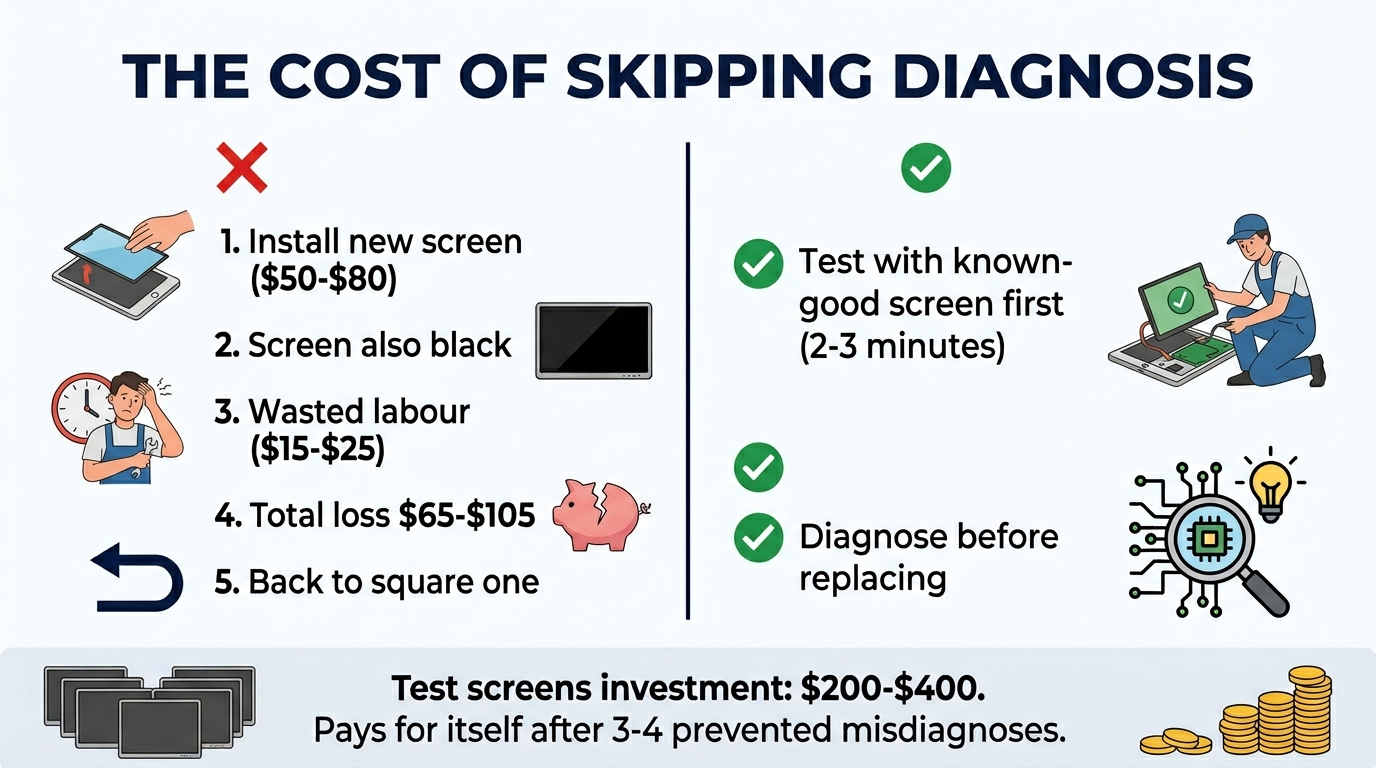
The single most expensive mistake in black screen diagnosis is skipping the known-good screen test and assuming it's a display problem. Here's how it plays out:
- Customer brings in iPhone with black screen
- Technician sees the phone vibrates and rings — assumes screen fault
- Technician installs a new $50–$80 screen
- New screen is also black
- Technician now has to explain to the customer that the problem isn't the screen, the repair will cost more, and the new screen they just installed is... wasted? Reusable?
This scenario wastes a screen (which may get damaged during removal), wastes 30+ minutes of labour, and damages customer trust. The known-good screen test takes 2–3 minutes and prevents all of it.
The economics: A single misdiagnosis costs your shop $50–$80 in screen cost plus $15–$25 in wasted labour — roughly $65–$105 lost. Keeping one test screen per common model ($200–$400 total investment) pays for itself after 3–4 prevented misdiagnoses.
For more on how screen quality issues show up after installation and how to prevent callbacks, see our guide on aftermarket screen customer complaints and how to handle them.
When Black Screen Is a Screen Quality Issue
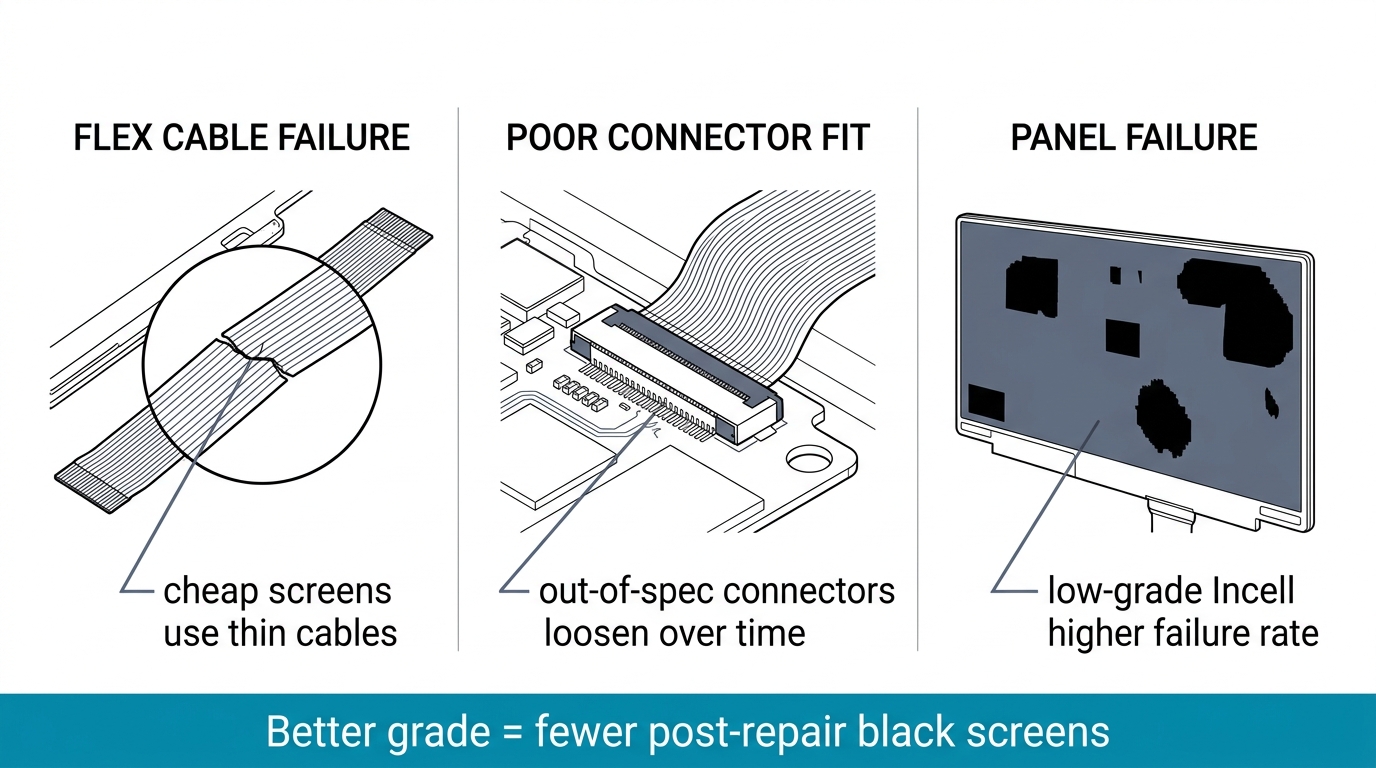
There's a fourth scenario that repair shops encounter: a phone comes back with a black screen after a screen replacement. The customer had their screen replaced — either at your shop or somewhere else — and now the display has gone dark again.
This is almost always a quality issue with the replacement screen. Common causes:
- Flex cable failure — cheap screens use thin flex cables that fail under normal bending during installation or daily use. The cable cracks internally, cutting the display signal.
- Poor connector fit — aftermarket screens with out-of-spec connectors don't seat firmly in the logic board FPC socket. The connection loosens over time from normal phone handling.
- Display panel failure — very low-grade Incell screens have higher failure rates, especially under temperature changes or after drops that wouldn't damage a higher-grade panel.
This is why screen grade matters even beyond initial display quality. A screen that costs $15 but fails in 3 months costs more than a screen that costs $45 and lasts 2+ years — once you factor in the callback, the replacement screen cost, and the labour to redo the job.
For a deeper dive into how screen grades affect long-term reliability and how to spot quality issues before installation, see our guide on spotting fake and low-quality phone screens and our wholesale phone screen QC inspection guide.
Stocking reliable replacement screens matters. The most common post-repair black screen complaint comes from low-grade screens with weak flex cables. We supply quality-tested Incell, Hard OLED, and Soft OLED screens with verified flex cable durability. Request a quote for grade samples and wholesale pricing.
Frequently Asked Questions
Is the iPhone black screen of death fixable?
In most cases, yes. About 70–80% of "black screen of death" cases in repair shops turn out to be display-side faults — either a damaged screen or a loose connector — which are straightforward to fix with a screen replacement or connector reseat. The remaining 20–30% are board-level issues, which are fixable with micro-soldering skills but require specialised equipment.
What are signs of a failing phone screen vs a board problem?
A failing screen typically shows warning signs before going completely black: flickering, lines across the display, sections of dead pixels, or the screen cutting out intermittently. A board-level display fault usually causes a sudden, complete blackout with no prior visual symptoms. If the phone was dropped immediately before the black screen, the cause is more likely physical display damage. If it happened randomly during normal use, board-level causes are more likely.
My phone screen is black but I can hear everything — what's wrong?
Your phone's logic board and audio system are working normally, but the display pipeline is interrupted. The three most likely causes are: a damaged display panel (from a drop or impact), a loose display connector inside the phone, or a failed display driver component on the logic board. A repair shop can diagnose which one in under 5 minutes using the steps in this guide.
Should I try to fix a black screen myself?
A force restart is safe to try at home and fixes software-related black screens. Beyond that, opening the phone to inspect or reseat connectors risks damaging other components if you're not experienced — especially the Face ID flex cable on iPhone X and newer, which is easy to tear. If a force restart doesn't fix it, take it to a repair shop. The diagnostic fee ($20–$30 at most shops) is worth it compared to the cost of accidental damage.
How much does it cost to fix an iPhone black screen?
It depends entirely on the cause. A connector reseat costs $20–$40 (mostly labour). A screen replacement costs $80–$250 depending on the iPhone model and screen grade used. A board-level display IC repair costs $100–$200+ at shops that offer micro-soldering. Apple charges $279–$379 for out-of-warranty screen replacements regardless of cause. For a full breakdown of screen replacement costs by model, see our iPhone screen replacement cost guide.
Diagnose First, Replace Second
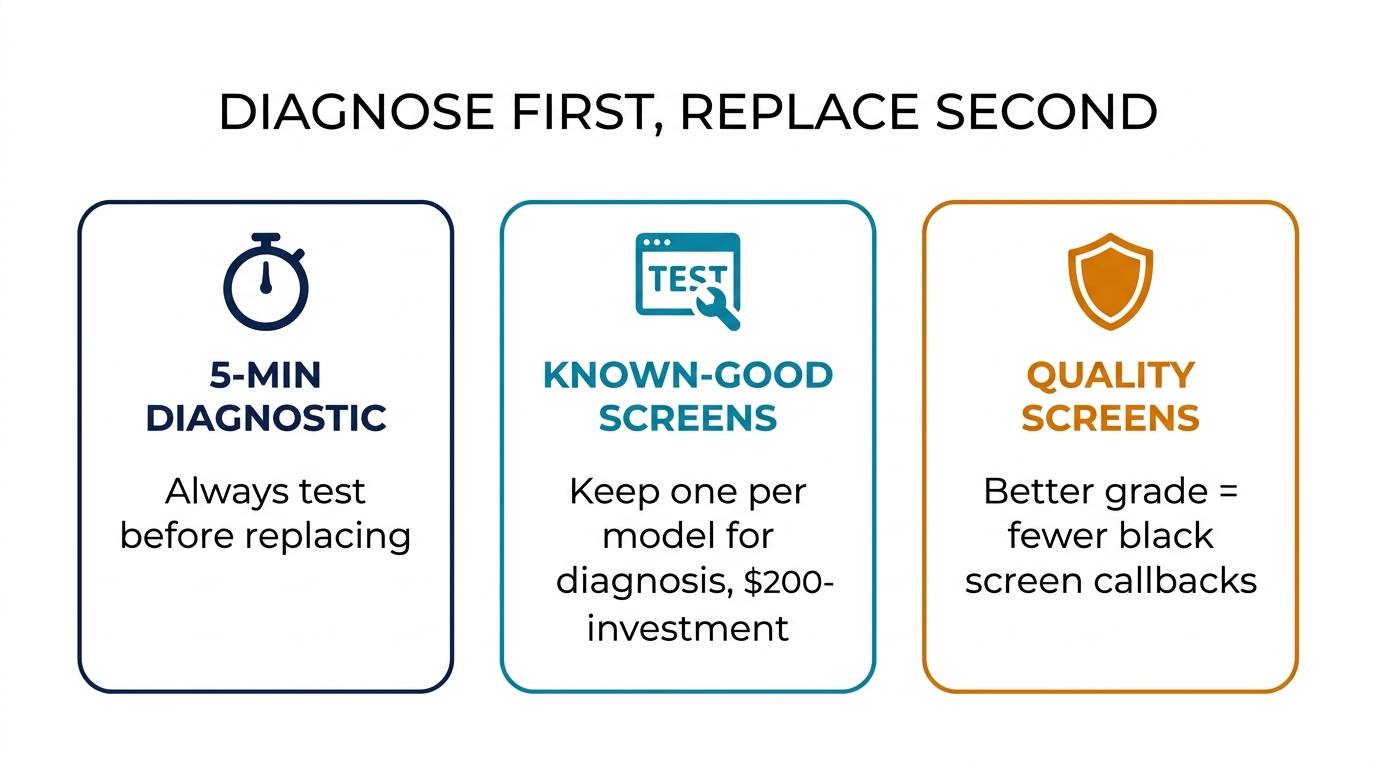
The black screen symptom is common, but the cause behind it varies enough that skipping diagnosis is a costly gamble. The 5-minute diagnostic sequence — confirm power, force restart, inspect connector, test with known-good screen — costs almost nothing and prevents the most expensive mistake in screen repair: replacing a screen on a phone with a board-level fault.
For repair shops, keeping a set of known-good test screens for common iPhone models is one of the best small investments you can make. It saves screens, saves labour, and builds customer confidence that your shop diagnoses before it charges.
Need reliable replacement screens for your diagnostic and repair workflow? We supply tested Incell, Hard OLED, and Soft OLED screens for iPhone 11 through 16 series. Get wholesale pricing with grade samples so you can test quality before committing to volume orders.