
Why Samsung Galaxy A-Series Charging Ports Keep Failing After Replacement
If you've had a Samsung Galaxy A charging port replacement failed within days or weeks of installation, you're not alone. The Samsung A-series — Galaxy A15, A25, A35, A55 — accounts for more charging port repair volume than any other Samsung line, and it also has one of the highest post-replacement failure rates in the aftermarket parts market.
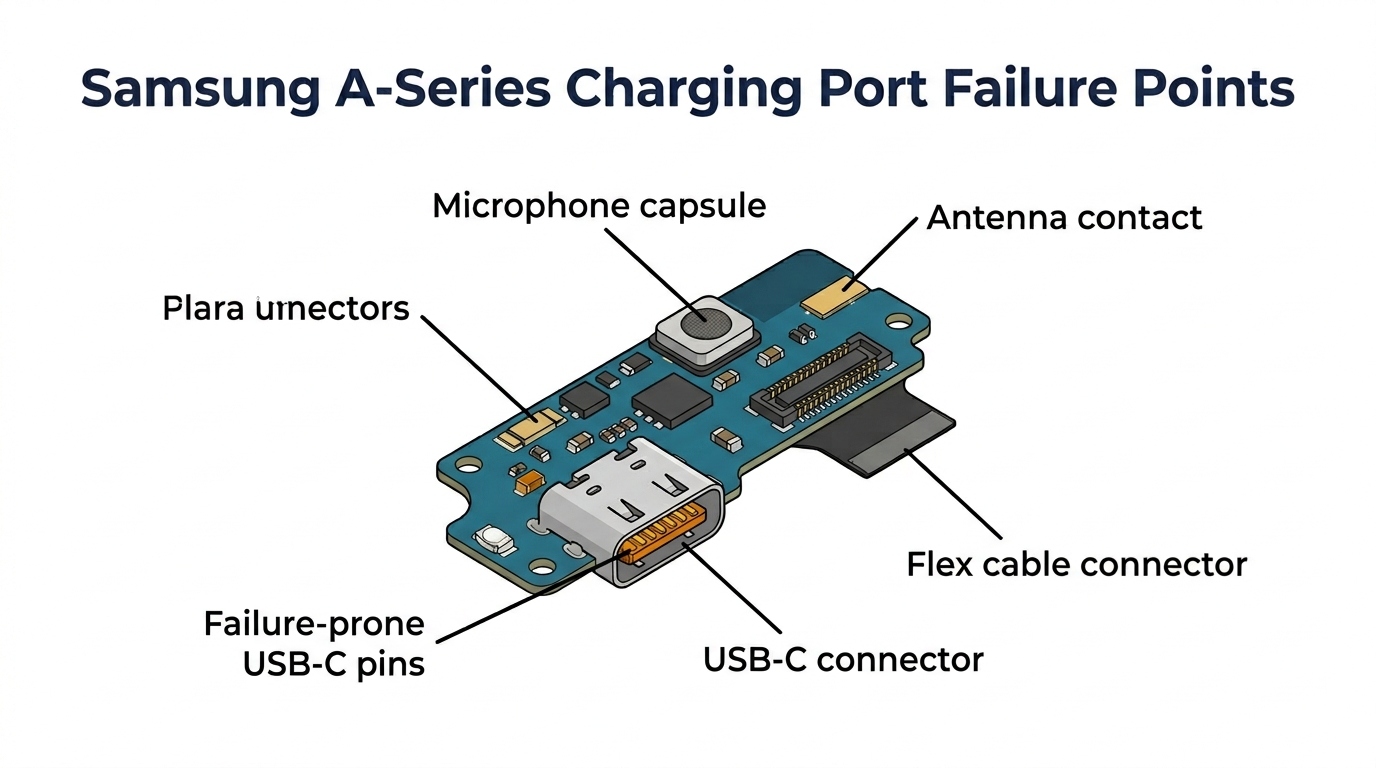
The problem isn't usually the repair. It's the part. Samsung A-series charging ports sit on a daughterboard (also called a sub-board or charging port flex assembly) that carries the USB-C connector, microphone, and sometimes the headphone jack and antenna contacts. When aftermarket daughterboards use inferior USB-C connectors or skip critical components on the board, the repair works on day one but fails within weeks.
Here's why these failures happen, how to identify bad parts before installation, and what to look for when sourcing charging port assemblies in bulk.
Need Charging Port Flex in Bulk?
Wholesale charging port assemblies for iPhone & Samsung — tested, factory-direct.
Get Wholesale QuoteWhy Samsung Galaxy A Charging Port Replacement Failed: The 3 Real Reasons
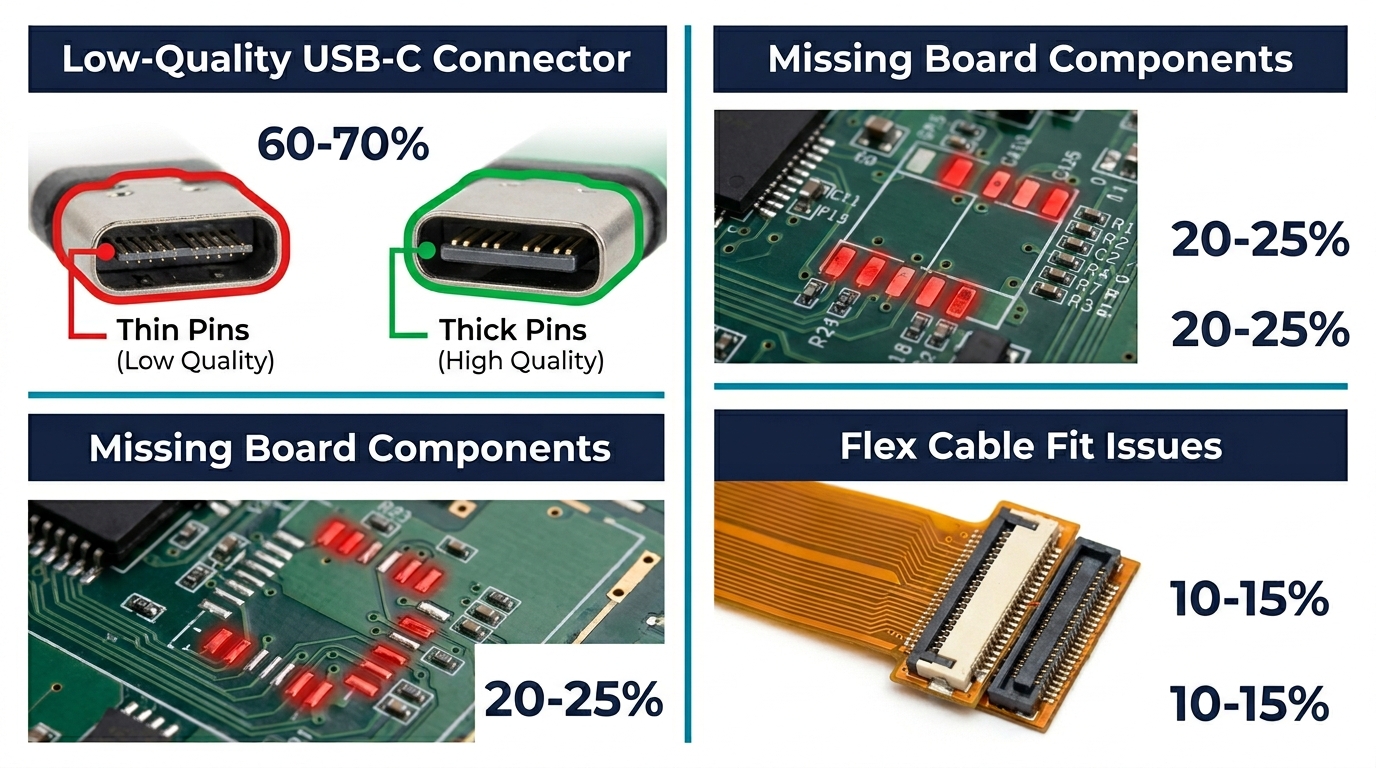
Not all charging port failures have the same root cause. Understanding which type you're seeing tells you whether it's a parts problem, a technique problem, or a design vulnerability.
1. Low-Quality USB-C Connector (Most Common — 60–70% of Failures)
The USB-C connector itself is the most frequent failure point. On low-grade aftermarket daughterboards, the connector uses thinner contact pins, softer spring metal, or lower-grade gold plating. The result:
- Loose connection within 2–4 weeks: The connector's internal spring tension weakens with daily plug/unplug cycles. Customer reports "charges only at certain angles" or "have to hold the cable in."
- Intermittent charging: The data/power pins make inconsistent contact, causing the phone to repeatedly connect and disconnect from the charger.
- Moisture detection false alarms: Poor connector sealing allows micro-debris into the pin cavity, triggering Samsung's moisture detection warning even in dry conditions.
How to spot it before installation: Compare the USB-C connector's insertion force against a known-good OEM board. On a quality connector, a USB-C cable should click in with firm, positive resistance. If it slides in too easily or feels loose on the aftermarket board, the connector will fail faster.
2. Missing or Inferior Board Components
The Samsung A-series daughterboard isn't just a charging connector — it carries additional components that vary by model:
| Component | Models That Include It | What Fails If It's Missing/Inferior |
|---|---|---|
| Microphone | All A-series | No audio on calls, voice recording fails |
| Headphone jack | A15, A25 | 3.5mm audio doesn't work |
| Sub-antenna contact | A35, A55 | Weak signal, dropped calls |
| SIM card reader flex | Some regional variants | SIM not detected after port replacement |
Low-grade aftermarket boards often replicate the USB-C connector accurately but use cheaper microphone capsules or skip the antenna contact entirely. The charging works, but the customer comes back with "my microphone stopped working" or "calls keep dropping" — problems that seem unrelated to the charging port repair.
How to spot it before installation: Visually compare the component count on the aftermarket board against the OEM original (or a reference photo). If the aftermarket board has fewer components or empty solder pads where components should be, it's a stripped-down version.
3. Flex Cable and Connector Fit Issues
The daughterboard connects to the Samsung mainboard via a flex cable and ZIF (zero insertion force) connector. Aftermarket boards with slightly different flex cable lengths or connector pitches can cause:
- Intermittent connection: The flex doesn't seat fully in the mainboard's ZIF socket, causing random disconnections
- Post-installation boot issues: The phone restarts randomly because the flex connection briefly breaks under normal handling
- Difficult reassembly: The board doesn't align with the phone's screw holes or frame mounting points, requiring force that stresses the flex
This is particularly common on the Galaxy A35 and A55, where the daughterboard has a tighter fit tolerance than older A-series models.
Model-by-Model: Samsung A-Series Charging Port Failure Patterns
Each A-series model has specific vulnerability patterns that affect which parts you should stock and how you test them.
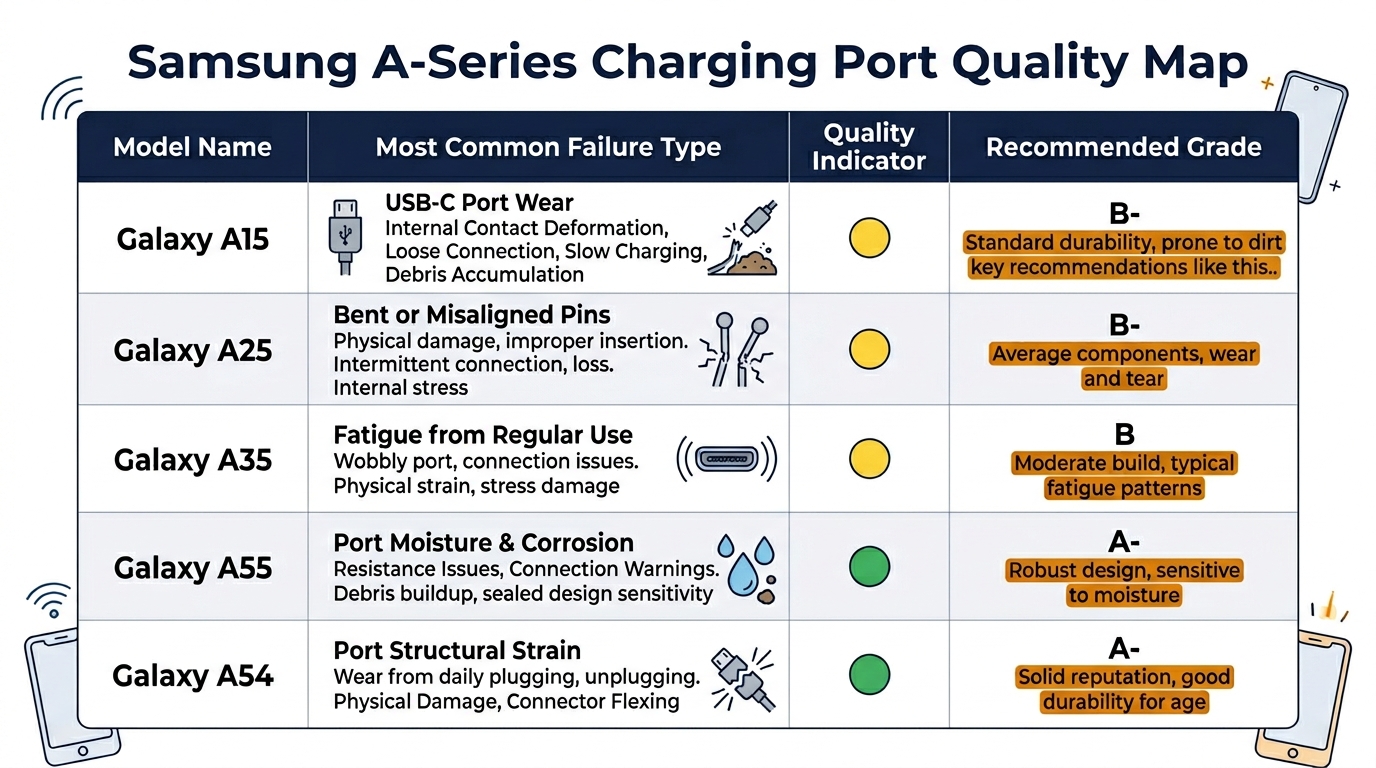
| Model | Most Common Failure | Aftermarket Part Quality Range | Recommended Grade |
|---|---|---|---|
| Galaxy A15 | Loose USB-C connector (2–3 week failure) | Wide — many suppliers, quality varies enormously | Test 3+ suppliers, prioritize metal-frame connectors |
| Galaxy A25 | Microphone failure after replacement | Medium — fewer suppliers than A15 | Verify microphone function on every unit before install |
| Galaxy A35 | Flex cable fit issues, antenna contact missing | Narrow — limited quality aftermarket options | OEM pull or premium aftermarket only |
| Galaxy A55 | USB-C connector + moisture false alarm | Narrow — newer model, aftermarket still maturing | Stock conservatively, test each batch thoroughly |
| Galaxy A54 | USB-C connector loosening | Medium — established model, decent aftermarket | Standard aftermarket with USB-C insertion test |
The pattern: Newer models (A35, A55) have worse aftermarket options because manufacturers haven't had time to reverse-engineer the board accurately. Older, high-volume models (A15, A54) have more suppliers but wider quality variance — which means more bad parts mixed in with good ones.
How to Test Charging Port Parts Before Installation
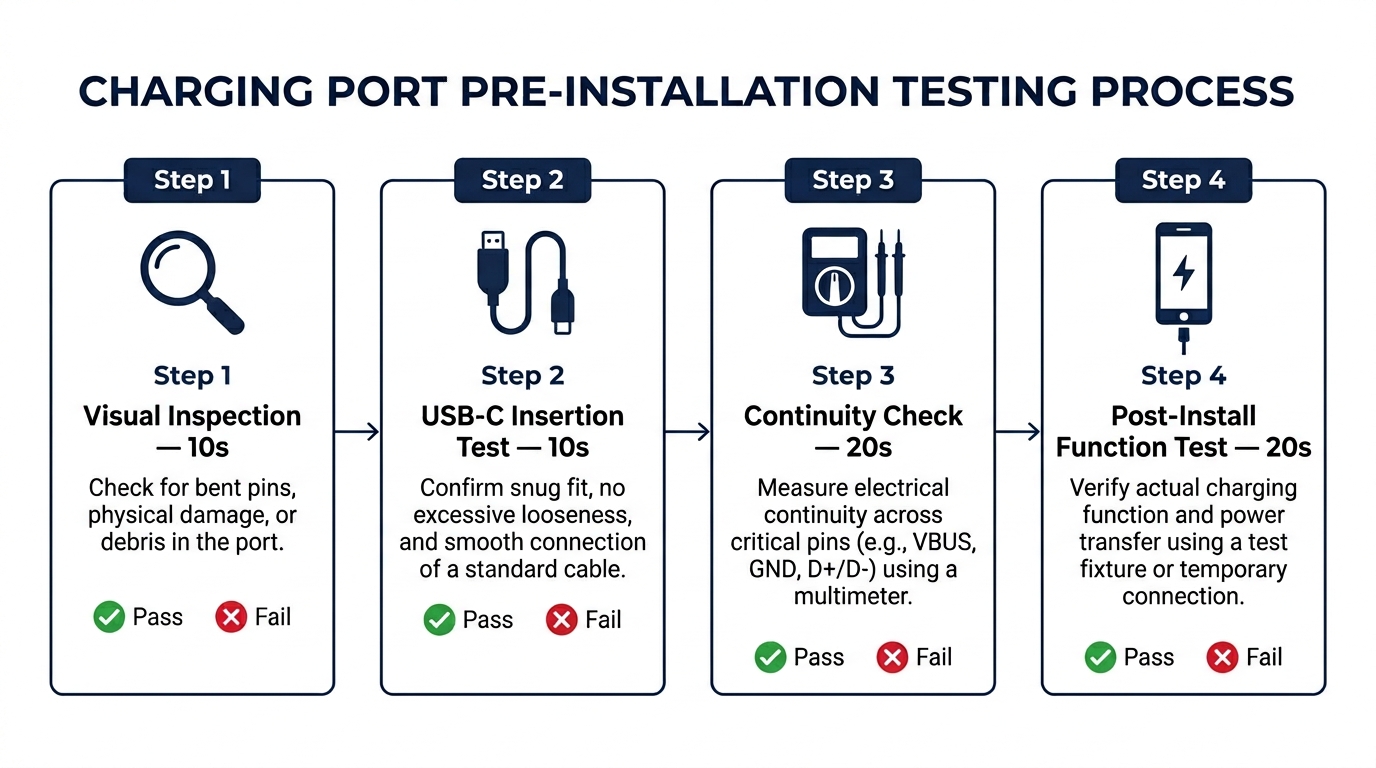
A 60-second pre-installation check catches most DOA and early-failure parts. Do this on every unit, not just samples.
Step 1 — Visual inspection (10 seconds):
- Check USB-C connector pin alignment — all 24 pins should be visible, evenly spaced, with consistent gold plating
- Verify all board components are present (compare against reference)
- Check flex cable for kinks, tears, or uneven solder joints
Step 2 — USB-C insertion test (10 seconds):
- Insert a known-good USB-C cable into the connector
- It should click in firmly with positive retention
- Gently wiggle the cable side-to-side — less than 0.5mm of play is acceptable, more indicates weak connector springs
- The cable should require deliberate force to remove
Step 3 — Continuity check (20 seconds, optional but recommended):
- Using a multimeter on continuity mode, check that the USB-C power pins (A4/B4 for VBUS, A1/B1 for GND) have continuity to the corresponding flex cable pads
- This catches dead-on-arrival boards with cold solder joints or broken internal traces
Step 4 — Post-installation functional test (20 seconds):
- After installing, test charging with 3 different cables (the customer's cable if available)
- Test microphone by making a call or recording voice
- If the model has a headphone jack, test it
- Check signal strength if the board carries an antenna contact
Need Samsung A-series charging ports with consistent quality? PRSPARES tests USB-C connector retention and component completeness on every batch before shipping. Request charging port samples with test data.
Sourcing Charging Ports That Don't Fail: What to Ask Your Supplier
The price difference between a $2 low-grade and a $5 quality aftermarket Samsung A-series daughterboard is small. The callback cost of installing a $2 part that fails in two weeks — re-do labor, replacement part, customer trust damage — makes the cheap option the expensive one.
Questions to ask before ordering:
-
"Is this a complete daughterboard or connector-only?" — Some suppliers sell the USB-C connector without the full board assembly. You want the complete daughterboard with all components for the specific model and region.
-
"What's the USB-C connector brand/source?" — Quality aftermarket boards use connectors from recognized component manufacturers. Ask if they can identify the connector source. Evasive answers = unknown quality.
-
"What's your DOA rate on this model?" — Legitimate suppliers track this. If they claim 0% DOA, they're either not tracking or not being honest. A realistic rate for quality aftermarket Samsung charging ports is 1–3%.
-
"Has the board design changed from the previous batch?" — Samsung occasionally updates regional board variants. A supplier who tracks version changes is one who actually inspects their inventory.
For a broader framework on using technical questions to evaluate parts suppliers, see our guide on how repair shops should use technical questions to screen suppliers.
Frequently Asked Questions
Why do Samsung A-series charging ports fail more than Samsung S-series?
Two reasons. First, volume: the A-series sells 3–4x more units globally than the S-series, so more aftermarket suppliers produce A-series parts, including low-quality operators. Second, cost pressure: A-series repairs command lower prices ($30–50 vs. $70–120 for S-series), so buyers source cheaper parts to maintain margin — pushing quality down across the supply chain. The S-series also has more stable aftermarket board designs with fewer regional variants.
Should I use OEM pull charging ports instead of aftermarket?
For newer models (A35, A55) where aftermarket quality is still inconsistent, OEM pulls are worth the premium — typically $8–12 vs. $3–5 for aftermarket. For high-volume, well-established models (A15, A54), quality aftermarket boards from a tested supplier are more practical and cost-effective. The key is testing: whichever grade you choose, run the 4-step pre-installation check on every unit.
How do I handle a customer whose replacement charging port failed?
Replace it immediately at no additional charge — the part cost is $3–5, far less than losing the customer. Document the failure, pull the failed part for your supplier claim, and switch to a different supplier or grade for that model if failures become a pattern. Most quality suppliers offer DOA replacement policies within 30–90 days — see our guide on what a phone parts DOA policy should include for what to negotiate.
Build Quality Into Your Samsung Charging Port Supply Chain
Samsung Galaxy A charging port replacement failures are almost always a parts quality issue, not a technician skill issue. The fix is upstream: source better daughterboards, test every unit before installation, and track failure rates by supplier and model.
The A-series is the bread and butter of Samsung repair volume. Getting the charging port quality right means fewer callbacks, faster turnaround, and customers who trust you with their next repair.
Looking for Samsung A-series charging ports with tested connector quality? PRSPARES provides model-specific daughterboards with USB-C retention testing and full component verification. Get a quote for Samsung A-series parts.
Related reading: Wholesale Samsung Screens: AMOLED Grades, Pricing, and Stocking | What Should a Phone Parts DOA Policy Include?