
iPhone Not Charging? Diagnosis Guide for Repair Shops

An iPhone not charging is one of the most common walk-in complaints at any repair shop. The customer plugs in their phone, nothing happens — or worse, it charges intermittently, stopping and starting every few seconds. They assume the charging port is broken and need it replaced. Sometimes they're right. Often, the actual cause is something simpler.
The difference between a quick $10 cleaning and a $60-90 charging port replacement comes down to accurate diagnosis. Rushing to replace the charging port on every "iPhone not charging" complaint wastes parts, wastes time, and — when the real problem was a bad cable or lint buildup — leaves the customer paying for a repair they didn't need. That's how you lose trust and reviews.
This guide walks through the complete diagnosis workflow that experienced repair techs use to identify why an iPhone won't charge, starting with the simplest causes and working toward hardware replacement. Whether the customer says "my iPhone won't charge at all" or "it charges slowly," this process covers both scenarios.
Need Charging Port Flex in Bulk?
Wholesale charging port assemblies for iPhone & Samsung — tested, factory-direct.
Get Wholesale QuoteThe 6 Reasons an iPhone Stops Charging
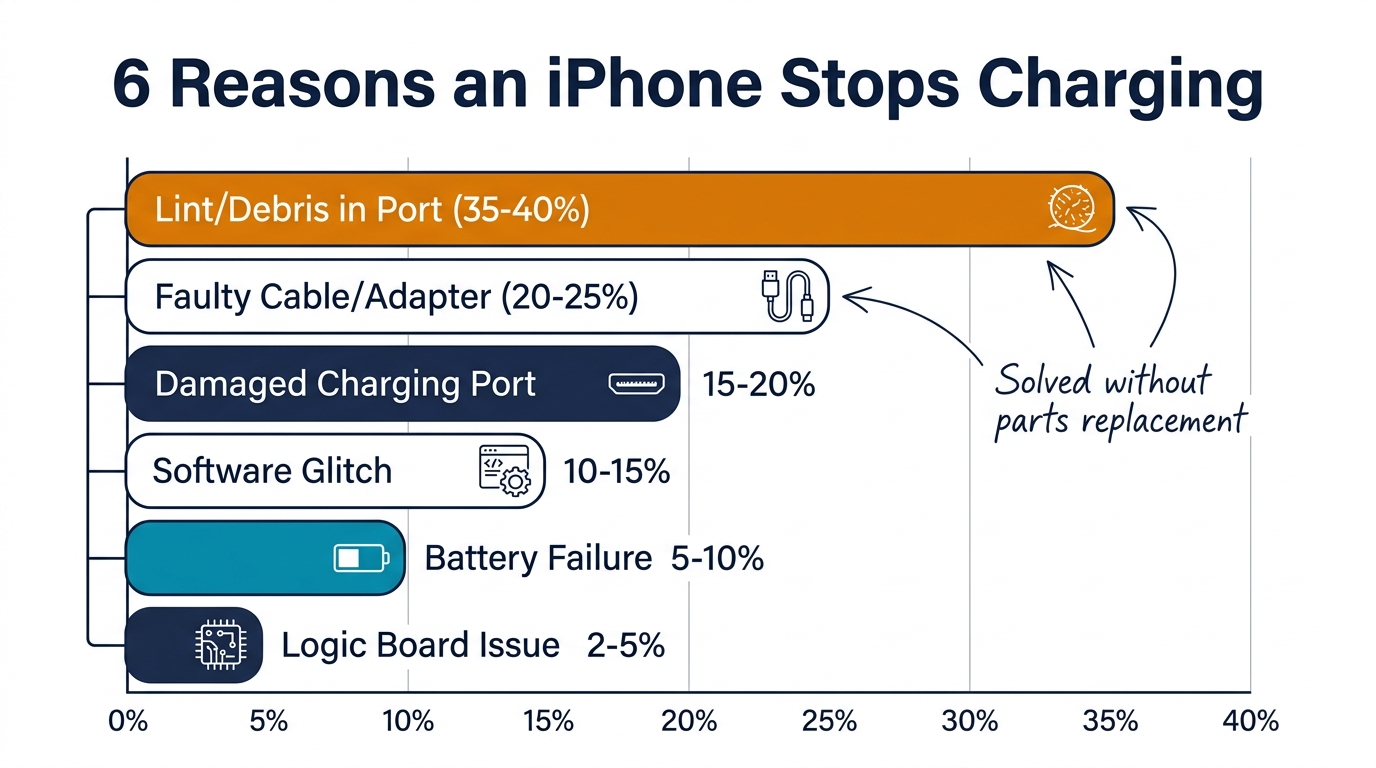
Before touching the phone with tools, understand the six most common causes. Each one has different symptoms and a different fix:
| Cause | How Common | Symptoms | Fix |
|---|---|---|---|
| Lint/debris in port | Very common (35-40%) | Cable doesn't click in fully, loose fit | Cleaning — no parts needed |
| Faulty cable or adapter | Common (20-25%) | Works with some cables but not others | Customer replaces cable |
| Software glitch | Occasional (10-15%) | Phone shows charging but percentage doesn't increase, or won't recognize cable | Force restart or settings reset |
| Damaged charging port | Common (15-20%) | No response to any cable, pins visibly bent/corroded | Charging port replacement |
| Battery failure | Occasional (5-10%) | Charges to 1% then dies, or charges but drains immediately | Battery replacement |
| Logic board issue | Rare (2-5%) | No response to anything, no signs of life | Board-level repair or not economical |
Key stat: Only 15-20% of "iPhone not charging" complaints actually require a charging port replacement. The rest are solved by cleaning, cable replacement, or software fixes. Accurate diagnosis saves both your parts inventory and the customer's money.
Step-by-Step Diagnosis Workflow
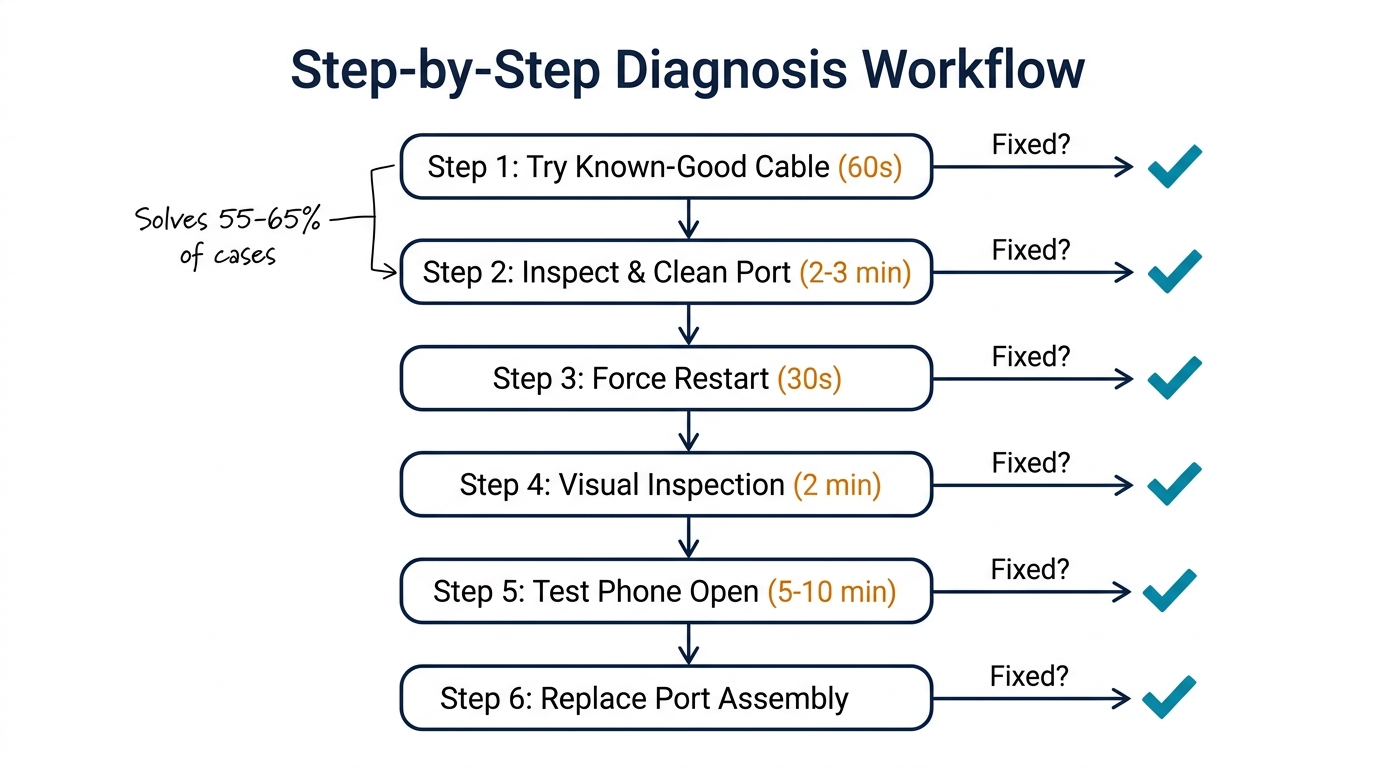
Step 1: Try a Known-Good Cable and Adapter (60 seconds)
Before doing anything else, test with your own cable and adapter — one you know works. This immediately rules out the most common non-hardware cause.
- Use an Apple-certified or MFi-certified Lightning/USB-C cable
- Use a wall adapter, not a computer USB port (lower power output can cause slow/failed charging)
- Try both a wired connection and wireless charging (if the phone model supports it)
If the phone charges with your cable: The customer's cable or adapter is the problem. Show them — it builds trust and takes 30 seconds.
If the phone still won't charge: Move to Step 2.
Step 2: Inspect and Clean the Charging Port (2-3 minutes)
Lint, dust, and pocket debris are the #1 cause of charging failures that walk into repair shops. Over months of daily pocket carry, compacted lint builds up at the bottom of the Lightning or USB-C port, preventing the cable from seating fully.
How to clean:
- Power off the iPhone
- Use a plastic spudger or anti-static brush (not metal — you can short the pins)
- Gently scrape along the bottom and sides of the port
- Use compressed air to blow out loosened debris
- Inspect with a flashlight or loupe — you should see clean, shiny contact pins
What you'll often find: A compressed wad of lint at the very bottom of the port. Once removed, the cable clicks in firmly and charging works immediately. This is a $10-15 service that takes 2 minutes and makes the customer feel like you just performed magic.
If cleaning doesn't help: Move to Step 3.
Step 3: Force Restart the iPhone (30 seconds)
Software glitches occasionally prevent charging recognition. A force restart clears temporary bugs without erasing data:
- iPhone 8 and later: Press and quickly release Volume Up, press and quickly release Volume Down, then press and hold the Side button until the Apple logo appears
- iPhone 7/7 Plus: Hold Volume Down + Side button simultaneously until the Apple logo appears
After the restart, plug in the charger and wait 30 seconds. If the phone starts charging, the issue was software-related.
If still not charging: Move to Step 4.
Step 4: Visual Inspection of the Charging Port (2 minutes)
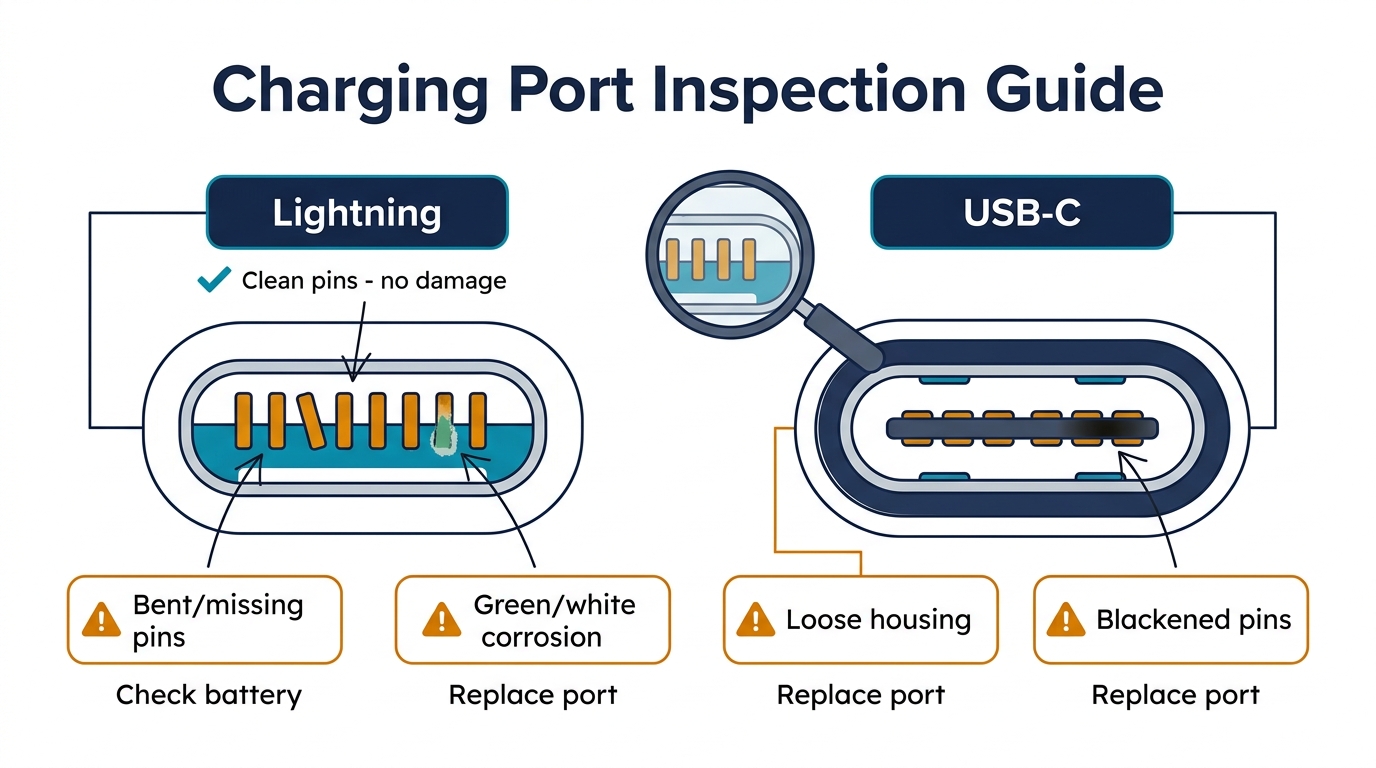
Now it's time for a closer look. Use a magnifying loupe or microscope to inspect the charging port pins:
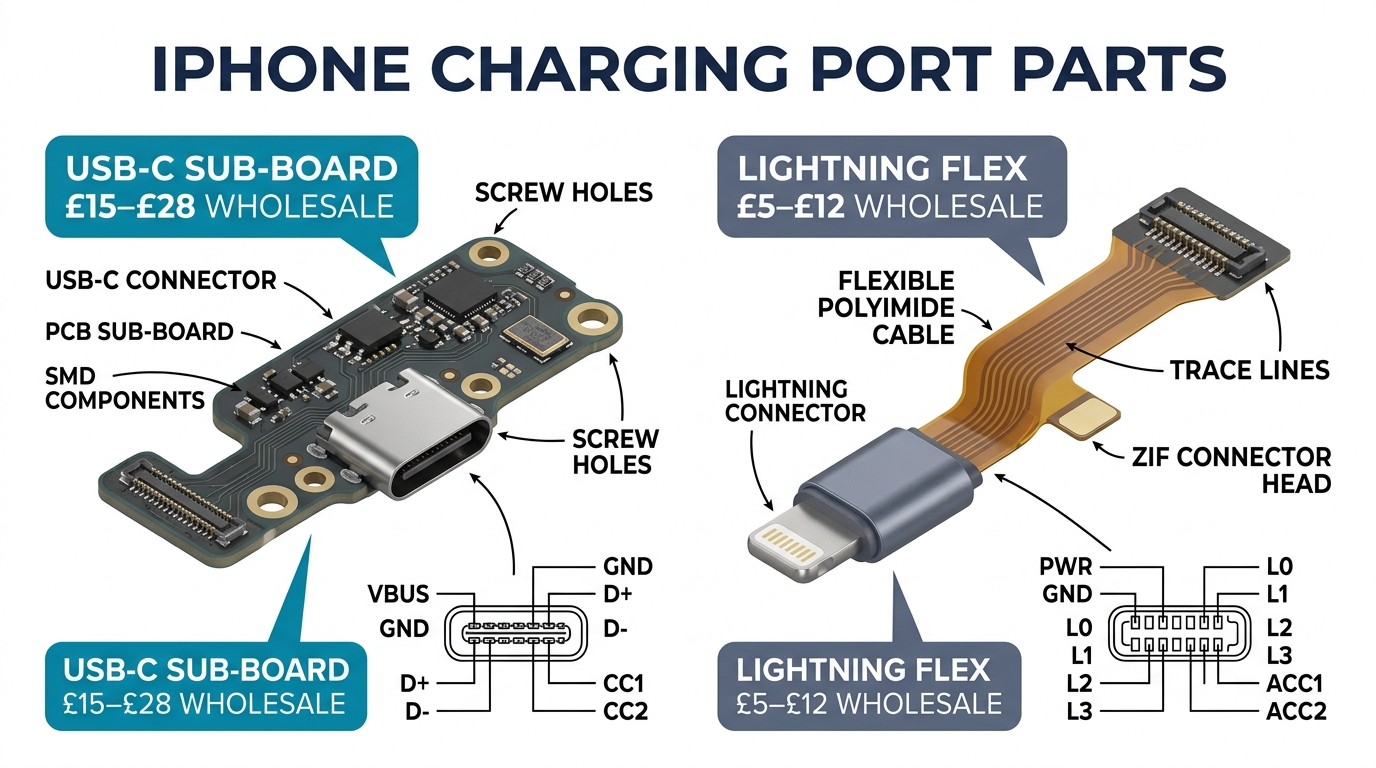
Lightning port (iPhone 5-14):
- Look for bent, broken, or missing pins on both sides of the port
- Check for corrosion (green or white residue on the pins) — indicates liquid damage
- Check if the port housing is loose or detached from the frame
USB-C port (iPhone 15+):
- Check the center tab for bent or broken pins
- Look for debris stuck between the pin rows
- Verify the port isn't physically damaged or pushed inward
| What You See | What It Means | Action |
|---|---|---|
| Clean pins, no damage | Port hardware is likely fine | Check battery and logic board |
| Bent or missing pins | Physical damage to connector | Replace charging port |
| Green/white corrosion | Liquid damage | Replace charging port (may also need board cleaning) |
| Loose port housing | Structural damage | Replace charging port assembly |
| Blackened or burned pins | Electrical damage (bad charger) | Replace charging port, inspect board |
Step 5: Test Charging with the Phone Open (5-10 minutes)
If the port looks physically fine but the phone still won't charge, open the phone and check the internal connection:
- Remove the display assembly and disconnect the battery
- Inspect the charging port flex cable connector on the logic board — is it seated properly?
- Reconnect the battery and test charging with the phone open
- Check if the battery connector shows signs of corrosion or damage
If the phone charges when you reseat the flex cable connector: The connection was loose. Secure it properly and reassemble.
If still no charging: The charging port assembly or the logic board charging circuit is the issue. Replace the charging port first — it's cheaper and more common than board-level failure.
Step 6: Replace the Charging Port Assembly
If steps 1-5 haven't resolved the issue and the port shows damage or the replacement test confirms a faulty port, proceed with replacement.
Replacement time by model:
- iPhone 11 and older: 15-20 minutes
- iPhone 12/13 series: 20-25 minutes
- iPhone 14 series: 20-30 minutes (tighter internal layout)
- iPhone 15/16 series (USB-C): 25-35 minutes (newer assembly design)
Post-replacement testing checklist:
- Phone charges with cable plugged in
- Charging indicator appears within 5 seconds
- Cable sits firmly in port with no wobble
- Make a phone call — test microphone clarity (the mic is on the charging port flex)
- Test vibration — Taptic Engine connector is on the same flex cable
- Test bottom speaker volume and clarity
That last point is critical. The charging port flex cable assembly includes the primary microphone and Taptic Engine connector. If you skip testing these, you might solve the charging problem but create a "people can't hear me on calls" callback. For more on what the charging port assembly includes and how to evaluate parts quality, see our charging port bulk buying guide.
When to Suspect the Battery Instead of the Charging Port
Sometimes the phone appears to not be charging, but the real problem is the battery. Here's how to tell the difference:
Battery problem signs (not the charging port):
- The charging icon appears but the percentage stays at 1% or doesn't increase
- The phone charges to a point (say 80%) then stops gaining percentage
- Battery Health shows below 75%
- The phone powers on when plugged in but dies immediately when unplugged
Charging port problem signs (not the battery):
- No charging icon appears at all when any cable is plugged in
- The cable feels loose or falls out easily
- The phone doesn't recognize that a cable is connected (no sound, no icon)
- Visible damage or corrosion in the port
About 5-10% of "not charging" cases are actually battery failures disguised as charging issues. If you replace the charging port and the problem persists, check the battery next. For more on diagnosing battery issues, see our iPhone battery draining fast diagnosis guide.
Pricing Charging Port Repairs Profitably
Charging port repairs sit in a sweet spot for repair shops: moderate repair difficulty, low parts cost, and strong customer willingness to pay.
| Service | Your Cost | Suggested Price | Margin |
|---|---|---|---|
| Port cleaning only | $0 (labor only) | $10-20 | 100% |
| Charging port replacement (iPhone 11-13) | $3-7 parts | $55-85 | 87-92% |
| Charging port replacement (iPhone 14-15) | $5-12 parts | $70-110 | 85-89% |
| Port replacement + battery (bundle) | $8-18 parts | $100-150 | 85-88% |
Upsell opportunity: When a customer comes in for charging port repair and their Battery Health is below 80%, offer a combined charging port + battery replacement at a bundle discount. You're already inside the phone — the additional labor is minimal, and the customer gets both problems fixed in one visit.
Common Diagnosis Mistakes to Avoid
Mistake 1: Replacing the port without cleaning first. Always clean the port before committing to replacement. 35-40% of charging issues are solved by cleaning alone. Replacing a perfectly good port is wasted inventory and unnecessary labor.
Mistake 2: Not testing with a known-good cable. If you test with the customer's frayed, gas-station Lightning cable and it doesn't work, that proves nothing. Always use your own verified cable.
Mistake 3: Skipping the microphone test after replacement. The primary microphone lives on the charging port flex cable. If you install a cheap flex assembly with a defective microphone, the customer won't discover it until their next phone call — and they'll blame your repair.
Mistake 4: Assuming logic board failure too quickly. Board-level charging circuit problems exist but are much rarer than port or battery issues. Always replace the charging port and battery before diagnosing a board problem. Those two parts together cost $10-20 — board-level repair costs $80-150 or more.
Mistake 5: Not documenting the diagnosis. Record what you tested and what you found before starting the repair. If the customer comes back with a different issue, your documentation shows exactly what was wrong and what you fixed.
FAQ
Why is my iPhone not charging when plugged in?
The most common cause is lint or debris compacted in the charging port — this prevents the cable from making full contact with the charging pins. Other causes include a damaged cable, a software glitch, corroded or bent port pins, or a failing battery. A repair shop can diagnose the exact cause in 5-10 minutes and determine whether you need a simple cleaning ($10-20) or a port replacement ($55-110).
How do I know if my iPhone charging port is broken?
Signs of a broken charging port include: the cable feels loose or falls out, no charging icon appears when plugged in, visible damage or corrosion inside the port, or the phone only charges at certain cable angles. If cleaning the port and trying a different cable doesn't fix the issue, the port hardware itself is likely damaged and needs replacement.
Can a broken iPhone charging port be fixed?
Yes. iPhone charging port replacement is a standard repair performed by thousands of shops worldwide. The charging port is part of a flex cable assembly that can be swapped in 15-35 minutes depending on the iPhone model. The repair costs $55-110 at independent repair shops — significantly less than Apple's device replacement pricing.
Why does my iPhone charge slowly?
Slow charging is usually caused by a low-wattage charger (using a 5W adapter instead of 20W), a damaged or non-certified cable, background apps consuming power faster than the charger supplies it, or partial debris blockage in the charging port. Try a 20W+ adapter with a certified cable first. If still slow, have the port inspected — partial lint blockage can reduce charging speed without stopping it entirely.
How much does it cost to fix an iPhone that won't charge?
At independent repair shops: port cleaning costs $10-20, charging port replacement costs $55-110 depending on the model, and if the battery is also the issue, a combined repair runs $100-150. Apple charges $269-$600 for device replacement since they don't offer standalone port repair on most models. Independent repair is typically 50-80% cheaper for charging issues.
Diagnose First, Replace Smart
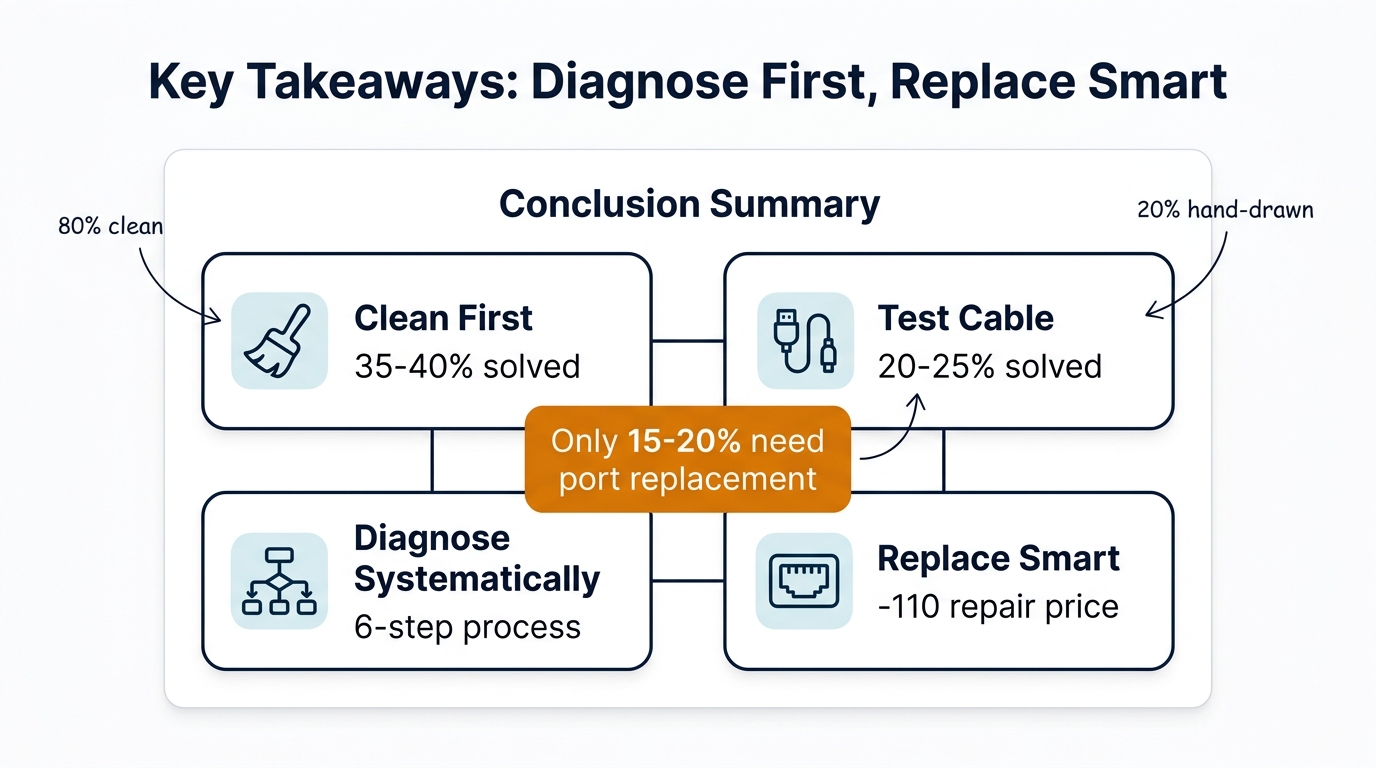
The most profitable approach to "iPhone not charging" complaints is systematic diagnosis — not automatic port replacement. Clean first, test with known-good cables, inspect visually, and only replace when the hardware is confirmed damaged. This approach saves parts, builds customer trust, and keeps your callback rate low.
When you do need to replace charging ports, the quality of the flex cable assembly matters more than most shops realize. The microphone, Taptic Engine connector, and speaker contacts on that flex cable all need to work — not just the charging connector. Source from suppliers who test every component on the assembly, not just the charging function.
We supply complete iPhone charging port flex cable assemblies for all models from iPhone 8 through iPhone 16, with every batch tested for charging, microphone, and vibration function. Mixed-model orders start at 10 units.