
How to Verify 'Original' Phone Screens Without Trusting Supplier Labels Alone
In the wholesale phone parts market, "original" is one of the most overused and least reliable words you'll encounter. The same label gets applied to genuine OEM pull screens, factory refurbished panels, aftermarket screens with OEM-spec ICs, and sometimes outright copies. If you want to verify original phone screens, the supplier's word alone tells you almost nothing — you need a system.
This isn't necessarily dishonesty — the industry simply has no universal standard for what "original" means. What matters is whether you can verify what you're actually receiving, independent of whatever label the supplier uses. This guide gives you a 5-point verification system built for wholesale buyers, not end consumers checking their own phone.
Sourcing Replacement Screens in Bulk?
Incell / Hard OLED / Soft OLED grades — wholesale pricing, grade comparison on request.
Get Wholesale QuoteWhy "Original" Means Different Things in the Supply Chain
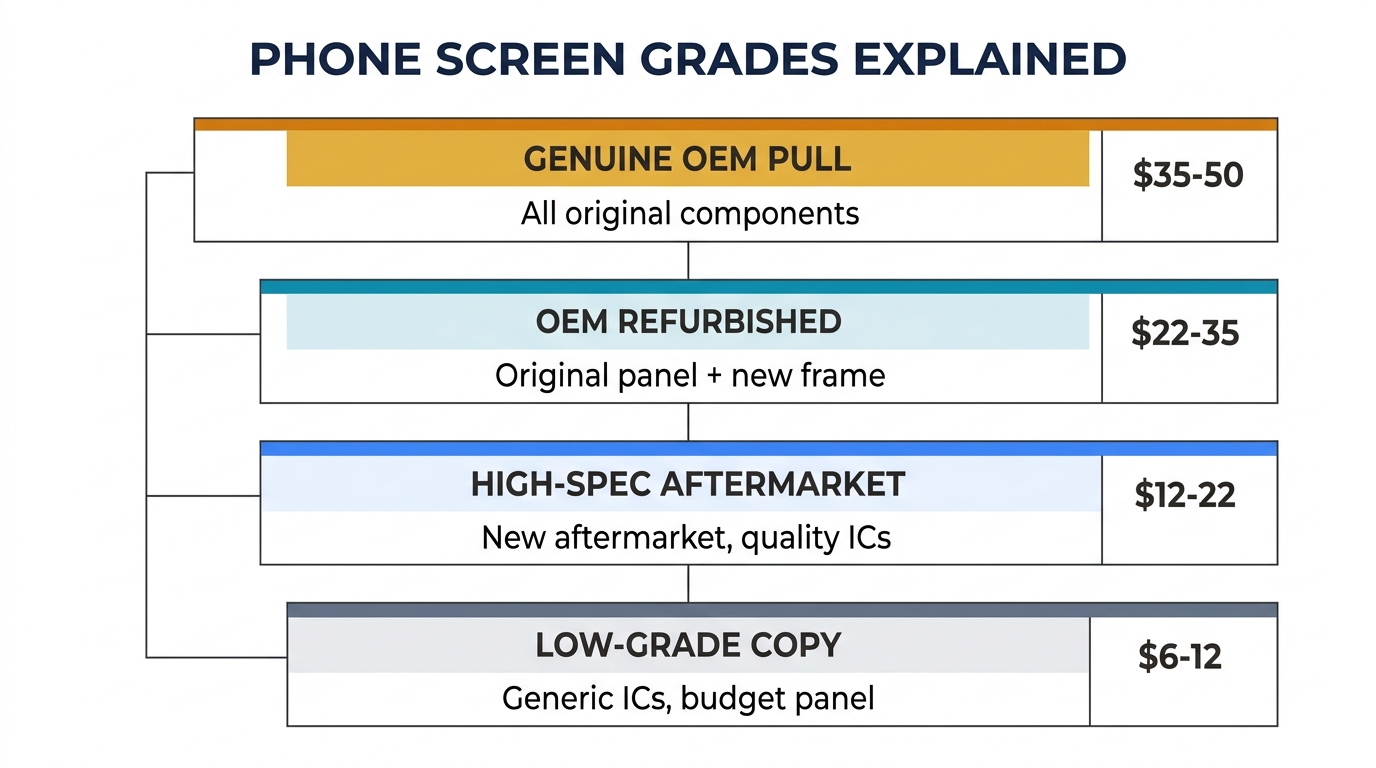
Before you can verify anything, you need to understand the four categories that suppliers commonly sell under the "original" label:
| Category | What It Actually Is | Typical Price Range (iPhone 13) | Common Supplier Labels |
|---|---|---|---|
| Genuine OEM Pull | Screen removed from a working device — all components original, including frame, flex, IC, and backlight | $35–50 | "Original," "Pulled Original," "OEM" |
| OEM Refurbished | Original OLED/LCD panel re-bonded to a new frame and flex cable — display layer is genuine, surrounding parts are new aftermarket | $22–35 | "Original," "OEM Refurb," "Reclaimed Original" |
| High-Spec Aftermarket | New aftermarket panel (Incell or Hard OLED) using quality ICs and flex cables — not original, but performs close | $12–22 | "OEM Quality," "Original Quality," "Grade A" |
| Low-Grade Copy | Budget aftermarket panel with generic ICs — lower brightness, touch responsiveness, and durability | $6–12 | Sometimes also labeled "Original" by dishonest sellers |
See the full four-grade comparison with live wholesale prices: iPhone Screen Grade Guide
The problem is clear: a buyer paying for genuine OEM pulls might receive OEM refurbished or even high-spec aftermarket — and the supplier's invoice will say "original" in every case.
The only way to know what you actually have is to verify the physical product. Supplier labels, invoices, and WhatsApp promises are not verification methods.
How to Verify Original Phone Screens: The 5-Point Checklist
This checklist is designed for batch-level incoming inspection, not for checking a single phone as a consumer. Each point focuses on things you can physically examine when receiving a wholesale shipment.
1. Frame and Housing Marks
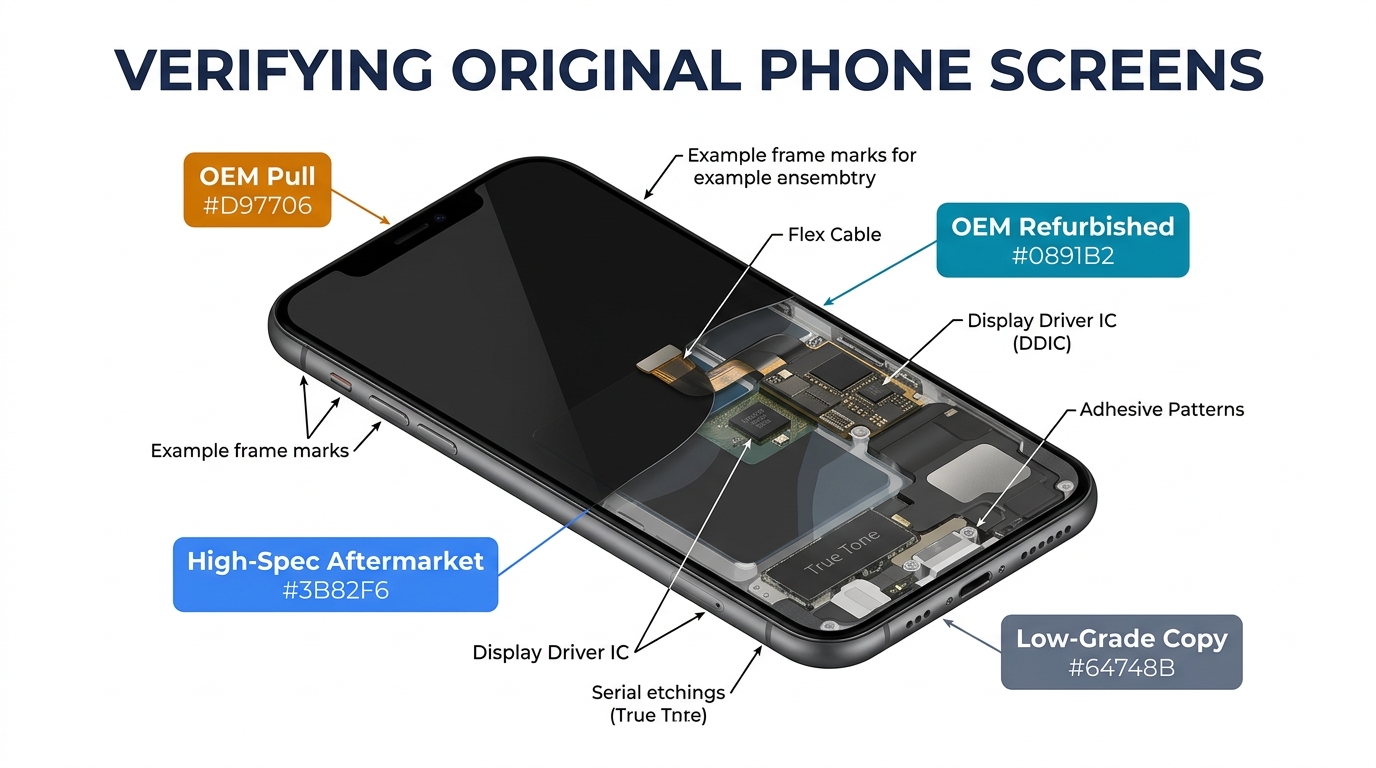
Genuine OEM screens have specific mold marks, serial etchings, or laser markings on the metal frame that are difficult and uneconomical to replicate. These vary by model and manufacturer:
- iPhone screens: Look for Apple's internal part numbers etched into the metal bracket. OEM pulls will have these; aftermarket frames typically don't, or they'll have a different format.
- Samsung screens: Check the frame edges for Samsung's factory stamping. Refurbished screens often have a new aftermarket frame — the frame itself looks too clean compared to the display age.
What to look for: Mismatched frame condition (brand-new frame + used display = refurbished, not "original pull"). Missing or inconsistent serial etchings = likely aftermarket.
2. Flex Cable Model Numbers
Every screen connects to the phone's mainboard via a flex cable, and OEM flex cables carry specific model numbers printed on them. This is one of the most reliable verification points.
- Compare the flex cable markings on your received screens against a known-genuine sample (you can source one verified OEM screen as a reference)
- Aftermarket flex cables typically have different part numbers, different fonts, or missing markings entirely
- On iPhone screens, the flex cable also carries the serialized chip for True Tone calibration — if this chip is absent or resoldered, the screen has been modified
Red flag: If every screen in a 100-unit batch has an identical flex cable number but the supplier claims they're OEM pulls (which come from different individual devices), something doesn't add up. OEM pulls should show slight variation in flex cable batches.
3. IC Chips and Driver Board
The display driver IC is the chip that controls how the screen renders images. OEM screens use specific ICs from suppliers like Synaptics (for many iPhones) or Samsung LSI.
- Visual inspection: On OLED screens, the driver IC is typically bonded to the flex cable. OEM ICs have specific markings. Generic aftermarket ICs often have different chip packages or blank surfaces.
- Functional test: Install the screen and check for features that depend on the original IC — auto-brightness response speed, color accuracy at low brightness, and touch sample rate. Aftermarket ICs often show slower auto-brightness transitions or slightly different color temperature at minimum brightness.
This is harder to verify visually than Points 1 and 2, but it's the most definitive test for the quality of the display layer itself.
4. True Tone and Serial Data (iPhone Specific)
For iPhone screens, True Tone calibration data is a strong authenticity signal:
- Genuine OEM pulls: True Tone data is stored on a chip on the screen's flex cable. When installed, the phone should support True Tone without any programmer or data transfer.
- Refurbished/aftermarket: True Tone data needs to be transferred from the old screen to the new one using a programmer (like JC or i2C). If a screen triggers the "Unable to verify this iPhone has a genuine Apple display" warning AND doesn't support True Tone without programming, it's not an OEM pull.
Practical test: Install the screen, go to Settings → Display & Brightness. If True Tone is available without any data migration, the screen's flex cable chip is likely original. If True Tone is greyed out, the screen has a non-original flex or the data wasn't transferred.
5. Batch Consistency
This is the verification step that separates wholesale buyers from consumers. When you receive a batch of 50 or 100 screens:
- Color temperature: Power on 5–10 random screens from the batch. Genuine OEM pulls will show slight individual variation (they came from different phones). Aftermarket batches tend to be very uniform (same factory line) or inconsistently poor.
- Brightness uniformity: Set all test screens to maximum brightness. OEM screens maintain consistent brightness edge-to-edge. Lower-grade aftermarket screens often show slight dimming near corners or edges.
- Physical consistency: Check if frames, screws, adhesive patterns, and flex cable routing are identical across the batch. OEM pulls will have minor cosmetic variation; aftermarket will be perfectly uniform.
The pattern to watch for: If a supplier says "OEM pull" but every screen in the batch looks factory-fresh with zero cosmetic variation — that's aftermarket, not pulled from individual used devices.
Need to compare screen grades before placing a bulk order? We can send labeled samples of each grade so you can build your own reference set. Request samples here.
When to Trust a Supplier's Label — and When to Verify Yourself
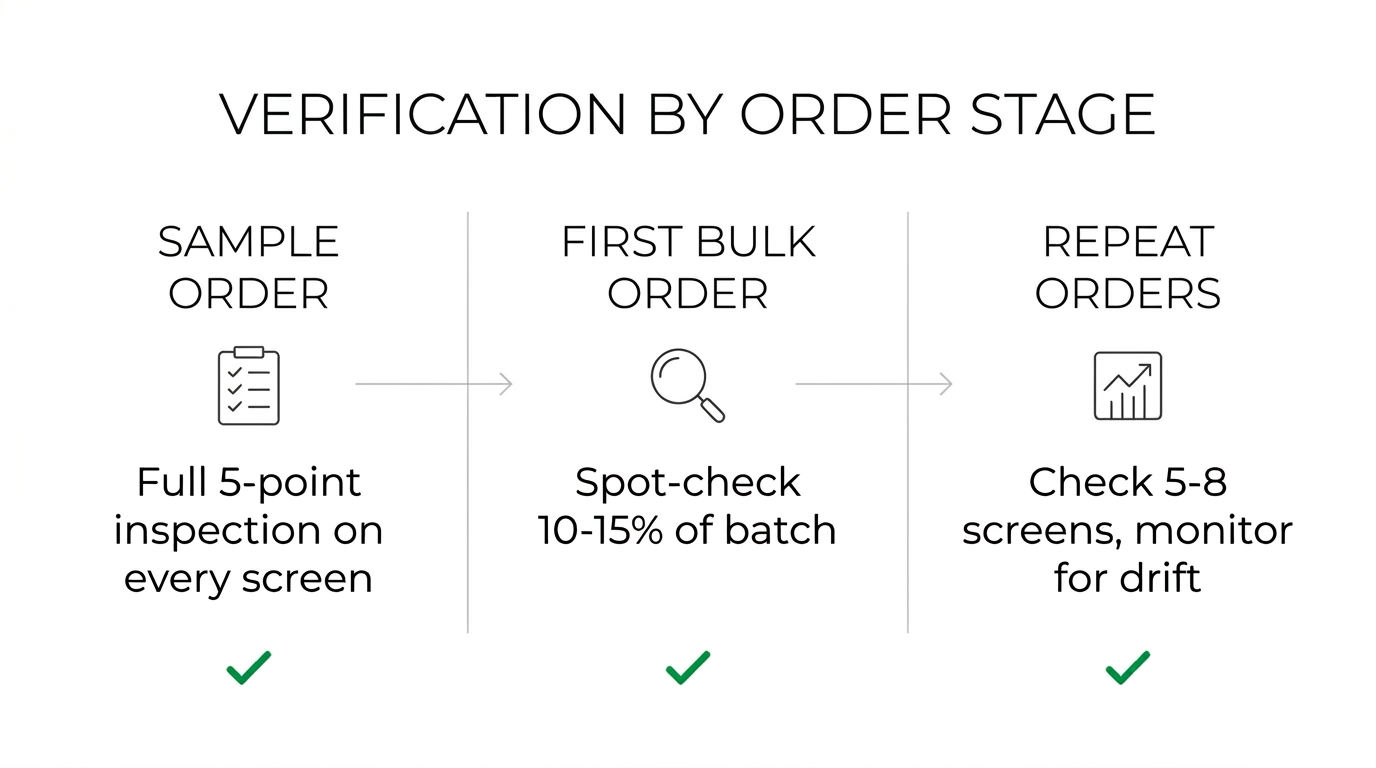
Not every shipment needs a full 5-point inspection. The level of verification should match your order stage:
Sample / Test Order Stage — Verify everything. Run all 5 checks on every sample screen. This is your baseline. Take photos of flex cables, frame markings, and IC chips as reference for future batches. This is when you establish what the supplier's "original" actually means in practice. (See our guide on how to use a test order to evaluate a supplier for the full process.)
First Bulk Order — Spot-check 10–15% of the batch. Focus on flex cables (Point 2) and batch consistency (Point 5). Compare against your test order reference photos. If flex cable markings or frame quality have changed, the supplier may have switched sources.
Repeat Orders — Monitor for consistency drift. Check 5–8 screens per batch. The main thing you're looking for: has anything changed since last time? Key warning signs that a supplier may be substituting lower-grade stock:
- Price dropped without you negotiating — they may have switched to cheaper sourcing
- Lead time suddenly shortened — could mean they switched from sourcing OEM pulls (slow, limited supply) to aftermarket (fast, unlimited)
- Flex cable markings or frame style differ from previous batches
- Customer complaint rate on repairs using these screens has increased
If you see two or more of these signals together, run a full 5-point verification on the next batch before placing another order. (For a deeper checklist on evaluating repeat orders, see what to check before placing a repeat order.)
Frequently Asked Questions
Can I use iPhone's "genuine parts" warning to verify screen authenticity?
Partially. Starting with iPhone 11, Apple shows a "non-genuine part" warning in Settings → About for replaced screens. However, this warning triggers for any non-Apple-installed screen — including genuine OEM pull screens installed by a third-party repair shop. So the warning tells you the screen wasn't installed at an Apple facility, but it doesn't distinguish between a genuine OEM panel and a copy. It's one data point, not a definitive answer.
Is an OEM refurbished screen a bad product?
Not necessarily. A well-done OEM refurbished screen uses the original display panel (the most expensive and quality-critical component) with a new frame and flex cable. For many repair shops, this offers 85–90% of OEM pull quality at 60–70% of the price. The key is knowing that's what you're getting — and not paying OEM pull prices for it. Grade transparency matters more than the grade itself.
What if the supplier won't let me inspect samples before ordering?
Walk away, or at minimum keep your first order small enough that you can afford to lose it. Any legitimate supplier who actually stocks the grades they claim will have no problem sending 3–5 sample screens for your inspection. Reluctance to provide samples is one of the strongest signals that the actual product won't match the label. (See our full guide on how to spot fake phone screens for more verification techniques.)
Build Your Verification Standard, Not Your Trust in Labels
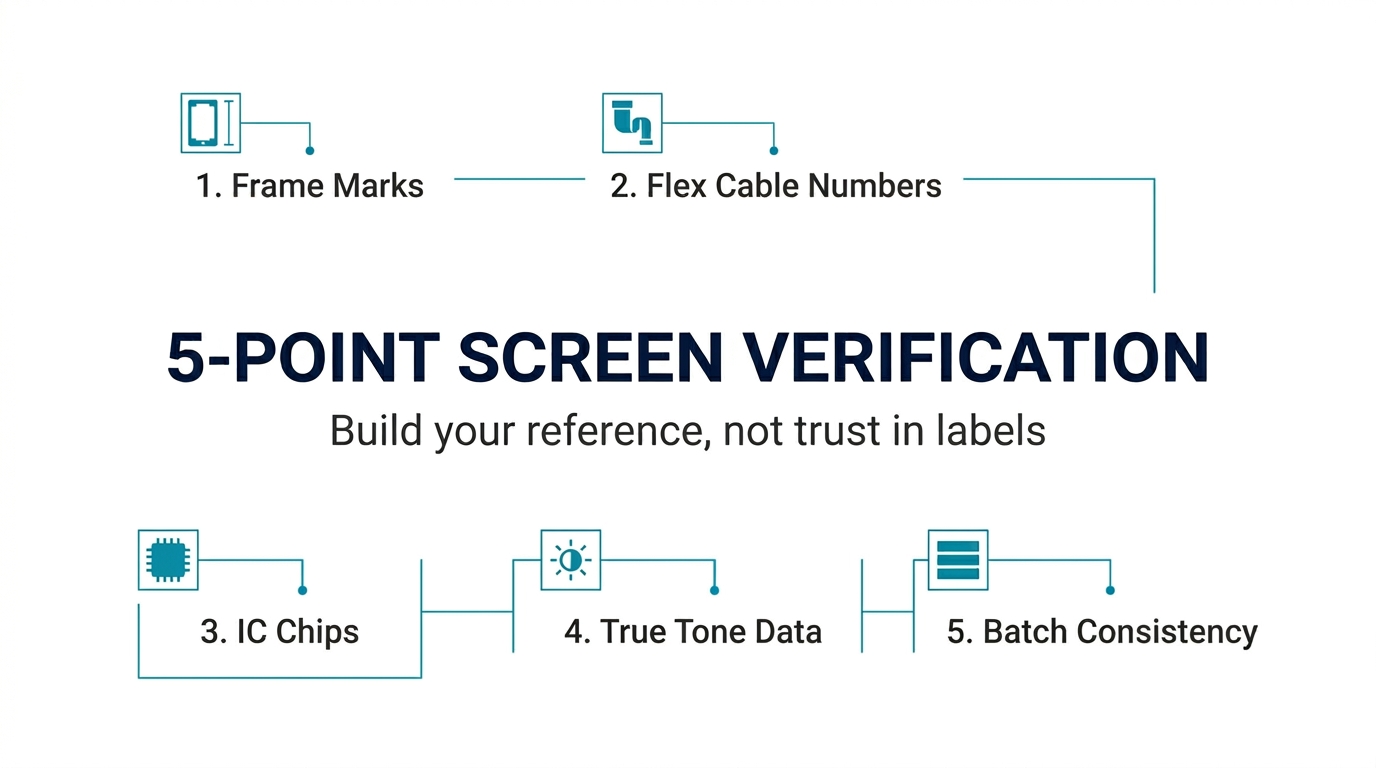
The wholesale phone screen market runs on relationships, but smart buying runs on verification. A good supplier won't be offended by your inspection process — they'll welcome it, because it means you're a serious buyer who will keep reordering once you've confirmed the quality.
Start with a single verified reference screen for each grade you buy. Use the 5-point checklist to establish your baseline. Then maintain that standard across every order. Over time, your own verification data becomes more valuable than any supplier's label.
The goal isn't to distrust every supplier. It's to make your purchasing decisions based on what you can see and measure — not on what someone writes on a sticker.
Ready to see the actual difference between screen grades? PRSPARES provides clearly labeled samples across all grades — OEM pull, OEM refurbished, and aftermarket Incell/Hard OLED — so you can build your reference library before committing to bulk. Request a sample comparison here.
Related reading: OEM vs Aftermarket Phone Screens: What Wholesale Buyers Need to Know | Wholesale iPhone Screens Buyer Checklist