

iPhone 14 Screen Replacement: The Design Change That Breaks Screens (And How to Avoid It)
A technician in our network — 6 years of experience, hundreds of iPhone repairs under his belt — cracked his first iPhone 14 screen within 30 seconds of starting the job.
He did exactly what he'd done on every iPhone since the iPhone 6: heated the edges, applied the suction cup to the front, and started prying the screen upward from the bottom.
The screen cracked clean across the middle.
Here's what he didn't know: the iPhone 14 (standard model) is the first iPhone that opens from the back, not the front. Apple redesigned the internal chassis to make repairs easier — but in doing so, they created a trap for every technician who learned on older models.
That one mistake cost him a £50 screen. We've seen this happen dozens of times across our repair shop network. This guide will make sure it doesn't happen to you.
The iPhone 14 Design Split You Need to Understand
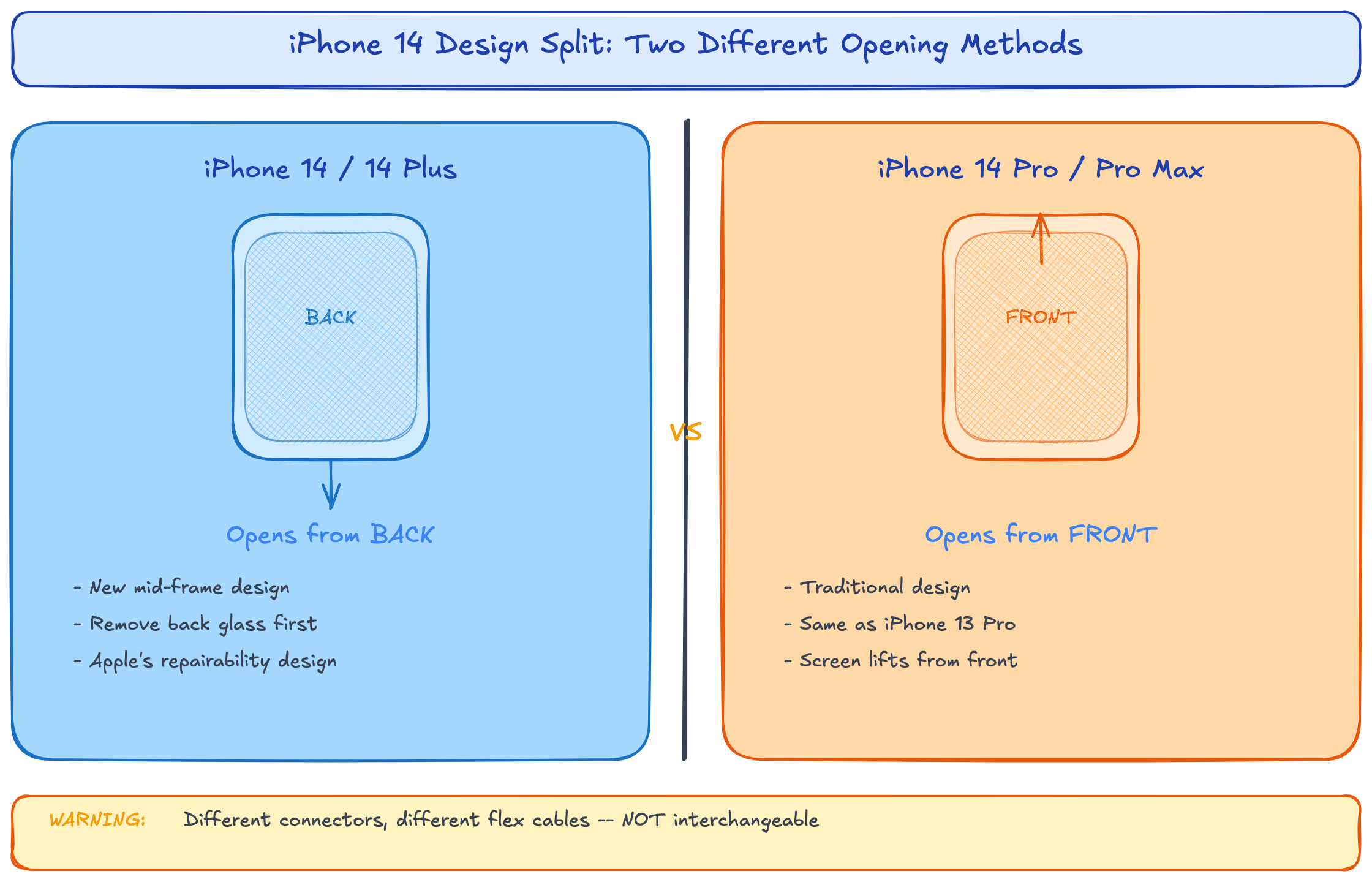
Before we talk about costs and parts, you need to understand something critical: the iPhone 14 family has two completely different internal designs.
iPhone 14 and iPhone 14 Plus: New mid-frame design. The back glass is removable. The screen is accessed by removing the back panel first, then disconnecting from the inside. This is Apple's "repairability" design — and it's genuinely easier once you know the approach.
iPhone 14 Pro and iPhone 14 Pro Max: Traditional front-opening design, same as iPhone 13 Pro. Screen lifts from the front using the standard suction cup method.
Why this matters for parts ordering: The standard iPhone 14 screen assembly is physically different from the Pro version. They use different connectors, different flex cable routing, and different adhesive patterns. Mixing them up is impossible to do accidentally (they won't fit), but ordering the wrong one wastes time and shipping costs.
iPhone 14 Screen Replacement Cost: Every Model, Every Option
Here's the full pricing breakdown for the UK market in 2026:
| Route | iPhone 14 | iPhone 14 Plus | iPhone 14 Pro | iPhone 14 Pro Max |
|---|---|---|---|---|
| Apple Official (AppleCare+) | £25 | £25 | £25 | £25 |
| Apple Official (no AppleCare+) | £249 | £279 | £329 | £379 |
| Repair Shop (Soft OLED) | £70–£110 | £80–£120 | £90–£140 | £110–£170 |
| Repair Shop (Incell) | £45–£70 | £55–£80 | £65–£95 | £75–£110 |
| DIY — Soft OLED Part | £35–£55 | £40–£60 | £50–£75 | £60–£90 |
| DIY — Incell Part | £18–£30 | £22–£35 | £28–£45 | £32–£50 |
The Pro Max Price Trap
Notice the jump from iPhone 14 Pro (£329 at Apple) to iPhone 14 Pro Max (£379)? That £50 gap exists at every level — repair shops, DIY parts, wholesale.
Here's the insider reason: the iPhone 14 Pro Max uses a 6.7-inch OLED panel. Larger OLED panels have exponentially higher manufacturing reject rates. A 6.1-inch panel might have a 15% factory reject rate; the 6.7-inch version runs closer to 25%. Those rejects get absorbed into the cost of the panels that pass QC.
What this means for repair shops: If you're quoting iPhone 14 Pro Max screen replacements at the same margin as standard iPhone 14 repairs, you're undercharging. The parts cost is 30-40% higher, but most shops only charge 15-20% more. Adjust your pricing.
Step-by-Step: iPhone 14 Screen Replacement (Standard Model)
This is where the iPhone 14 diverges from everything you've done before. Read carefully.
Tools Required
- Pentalobe screwdriver (P2)
- Y000 tri-point screwdriver (for internal brackets)
- Suction cup
- Spudger and plastic pry tools
- Heat gun or iOpener
- Tweezers
- New adhesive strips
The Procedure
Step 1: Remove the pentalobe screws (2x) at the bottom, flanking the USB-C port. Same as always.
Step 2: Here's where it changes. Apply heat to the BACK GLASS, not the screen. The iPhone 14's back glass is held with pull-tab adhesive. Heat for 2-3 minutes to soften it.
Step 3: Use the suction cup on the back glass. Lift gently. You'll feel the adhesive release. The back panel comes off as a single piece.
Step 4: Disconnect the battery. With the back removed, the battery connector is immediately accessible. Disconnect it first.
Step 5: Remove the internal shield plates covering the display connectors. There are multiple screws here — keep them organised. The iPhone 14 uses three different screw lengths in this area. Mixing them up can puncture the battery.
Step 6: Disconnect the display flex cables (3 connectors) and lift the screen assembly out from the front.
Step 7: Transfer components from old screen to new: earpiece speaker, proximity sensor flex, and the metal shield plate. The earpiece flex carries True Tone data — handle it carefully.
Step 8: Install the new screen, reconnect all cables, reconnect the battery, and test before sealing.
Step 9: Test checklist before sealing:
- Touch response in all four corners
- Face ID enrolment
- Earpiece audio (make a call)
- Proximity sensor (screen should dim when you hold phone to ear)
- True Tone (Settings > Display & Brightness)
Step 10: Apply new back glass adhesive and seal.
The Pro/Pro Max Procedure (Traditional Method)
The iPhone 14 Pro and Pro Max open from the front, like the iPhone 13 Pro. Heat the screen edges, suction cup on the front, open like a book from the left side. The rest of the procedure is standard.
The key difference: Pro models have an additional sensor bracket near the Dynamic Island cutout. This bracket is secured with very small screws (1.0mm) that are easy to strip. Use a fresh screwdriver bit and minimal pressure.
Why iPhone 14 Pro Max Screens Fail More Often
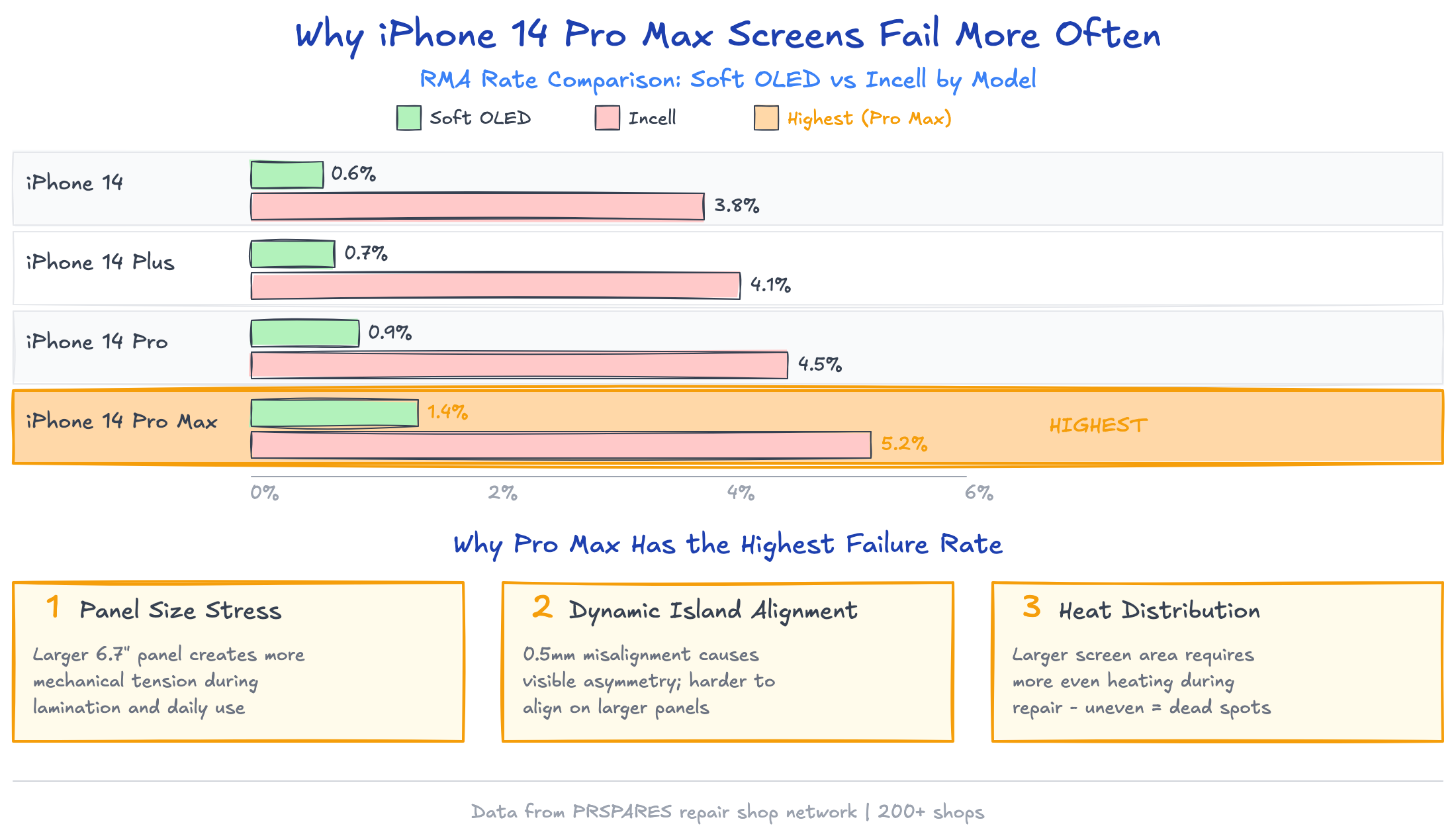
Our return data tells an interesting story:
| Model | Soft OLED RMA Rate | Incell RMA Rate |
|---|---|---|
| iPhone 14 | 0.6% | 3.8% |
| iPhone 14 Plus | 0.7% | 4.1% |
| iPhone 14 Pro | 0.9% | 4.5% |
| iPhone 14 Pro Max | 1.4% | 5.2% |
The Pro Max has the highest failure rate across both screen types. Three reasons:
1. Panel size stress. The 6.7-inch panel has more surface area under tension. During installation, even slight frame warping (common in dropped phones) creates uneven pressure that can cause dead spots weeks later.
2. Dynamic Island alignment. The Pro Max's Dynamic Island cutout requires precise alignment. A screen that's 0.5mm off-centre will have visible asymmetry around the pill-shaped cutout. Customers notice this immediately.
3. Heat distribution during removal. The larger screen needs more even heating. Technicians who concentrate heat on one area (a habit from smaller phones) create thermal stress points that weaken the new screen's adhesive bond.
The fix: For Pro Max installations, heat the entire perimeter for a full 3 minutes. Use a heat mat if you have one. And always check frame straightness with a flat edge before installing the new screen — a warped frame will kill any screen within weeks.
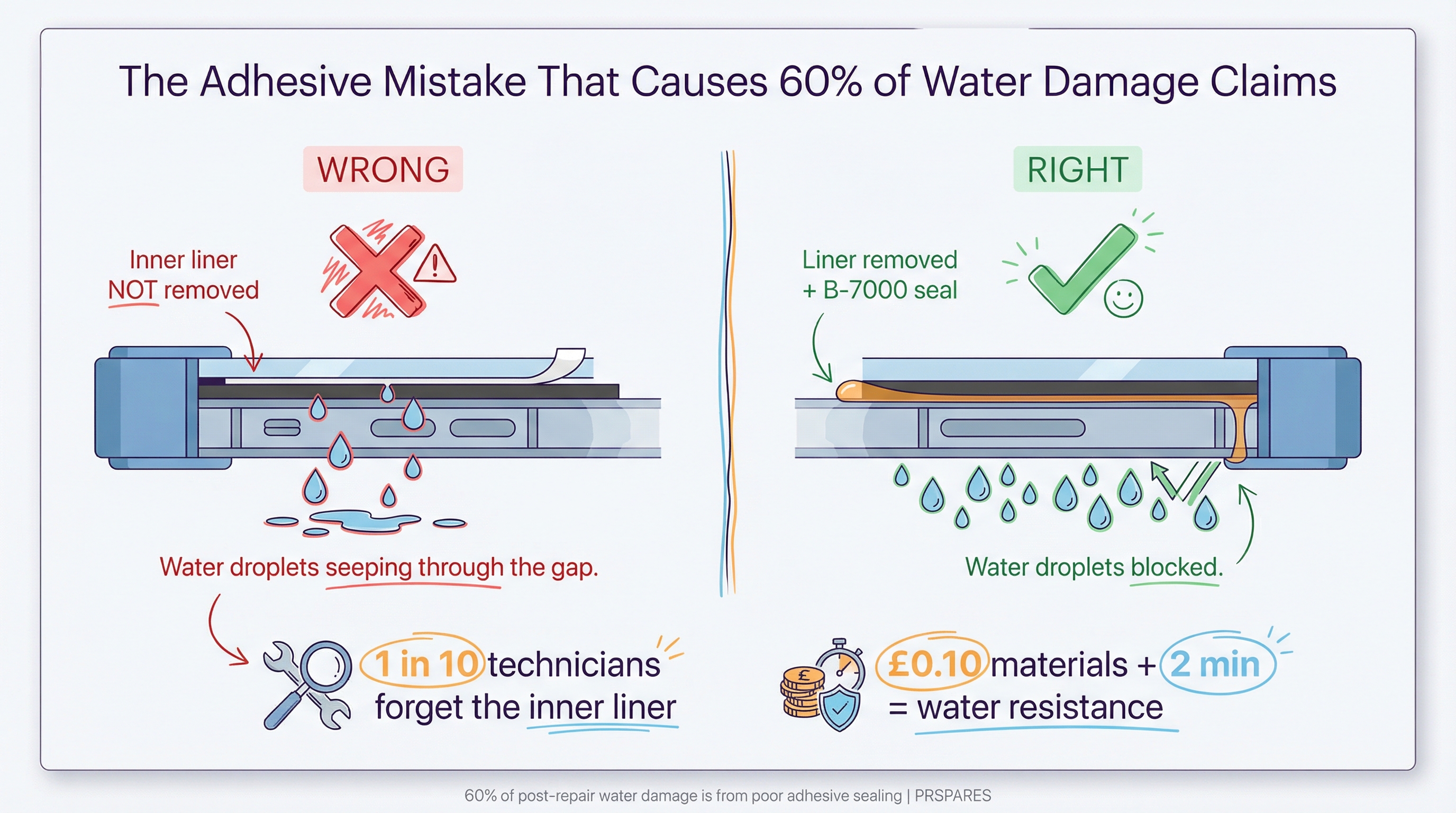
The Adhesive Mistake That Causes 60% of Water Damage Claims
Here's something repair shops rarely discuss openly: most post-repair water damage isn't from swimming or rain. It's from sweat and humidity entering through poorly sealed adhesive.
The iPhone 14's IP68 rating depends on a precise adhesive seal. Apple uses a custom-cut gasket that costs them pennies but isn't available aftermarket. What you get instead are pre-cut adhesive strips that approximate the original seal.
The problem: Most technicians apply the adhesive strip and press the screen down. Done. But the strip has a release liner on both sides, and in our experience, about 1 in 10 technicians forget to remove the inner liner. The screen feels secure, but there's zero water resistance.
The solution: After applying the adhesive strip, run your finger along the entire perimeter and feel for the liner edge. It's subtle — a slight ridge where the liner meets the frame. If you feel it, peel it off before seating the screen.
For shops that want to go further: Apply a thin bead of B-7000 adhesive around the perimeter after the strip is in place. It adds £0.10 in materials and 2 minutes of work, but it creates a secondary seal that dramatically improves water resistance. We recommend this for any customer who's paying for a premium Soft OLED screen.
Frequently Asked Questions
Is the iPhone 14 screen replacement easier than iPhone 13?
For the standard iPhone 14, yes — once you learn the back-opening method. Apple designed it for easier repair. The Pro models are comparable in difficulty to the iPhone 13 Pro.
Can I use an iPhone 14 screen on an iPhone 14 Plus?
No. Different screen sizes (6.1" vs 6.7"), different flex cables, different connectors. They are not interchangeable.
Does iPhone 14 screen replacement void my warranty?
If done by Apple or an Apple Authorised Service Provider, no. Third-party repairs technically void the warranty, but UK consumer law (Consumer Rights Act 2015) still protects you for pre-existing faults.
How long does an iPhone 14 screen replacement take?
Standard iPhone 14: 30-45 minutes for an experienced technician (add 10 minutes for the back-opening learning curve on your first one). Pro Max: 25-40 minutes.
Will Face ID work after screen replacement?
Yes, as long as you don't damage the TrueDepth camera assembly during the repair. On Pro models, be especially careful around the Dynamic Island sensor bracket.
What's the difference between iPhone 14 and iPhone 14 Pro screens?
Beyond size differences, the Pro models use ProMotion (120Hz adaptive refresh) with an LTPO OLED backplane. Standard iPhone 14 uses 60Hz OLED. Pro screens cost 30-40% more and are not cross-compatible.
What to Do Monday Morning
-
If you haven't repaired an iPhone 14 (standard) yet, practice the back-opening method on a dead unit before touching a customer's phone. The muscle memory from older iPhones will fight you. Budget 10 minutes to retrain your hands.
-
Check your Pro Max pricing. Pull up your last 10 iPhone 14 Pro Max repairs and calculate your actual margin after parts cost. If it's below 40%, you're leaving money on the table — customers expect to pay more for the larger model.
-
Audit your adhesive process. Next time you seal a screen, deliberately check for the inner release liner. Make it a checklist item. One water damage claim costs more than a hundred adhesive strips.
Looking for iPhone 14 screens with consistent quality across all four models? We stock Soft OLED and Incell options for iPhone 14, 14 Plus, 14 Pro, and 14 Pro Max — all batch-tested at our Shenzhen facility with QC documentation included. Request wholesale pricing from PRSPARES.
PRSPARES supplies iPhone 14 screen assemblies in all quality grades from our Huaqiangbei manufacturing base. Every batch is tested for colour accuracy, touch responsiveness, and PWM safety before shipping. Less than 1% RMA rate across our repair shop network.